Learn the method that is revolutionizing the way new labs’ members are trained on ROS fast with no hassle. Already used by many Universities and companies.
DESCRIPTION
Even if we would like to, engineering students do not receive proper ROS training during their undergraduate period.
This is a problem when students get engaged in the development of the Msc Thesis inside one of the labs of the University, or want to start their Ph.D. The students must dedicate a long time to get up to speed in ROS, before they can really use the code that is there already.
Typical option for the lab is to provide to the student with a computer, and a link to the ROS Wiki tutorials. Hence the student will pass the days and weeks trying to get the most of it.
In this one-hour webinar, we will show how to smooth the learning path for your interns in order to maximize their learning speed.
WEBINAR FOR:
Laboratory staffs who may need to equip their fellows or train their new lab’s member on ROS.
In this video we solve an error that happened when trying to compile a RQT Plugin by answering the following question:
Q: The error says: Make sure that you are calling the PLUGINLIB_EXPORT_CLASS macro in the library code, and that names are consistent between this macro and your XML
A: The problem in this specific case was that the RQT Plugin was not implementing the destructor TemplatePlugin::~TemplatePlugin().
Q: Hello! I want to subscribe data from .msg file. However the file has four other msgs inside. The format of the .msg file is:
Could you tell me how to read, for example, x,y,z coordinates inside geometry_msgs/Vector3?
A: I’ve created a custom msg (msg/mycustom.msg) in my package called mypkg, created a publisher and 2 subscribers, one in python, another in cpp. You can see below:
What will you learn in this post
Understand how to use the buoyancy plugin in gazebo
List of resources used in this post
The question on Gazebo Answers
A live version of this post on YouTube: https://youtu.be/evweU2MjNjc
The question is: buoyancy neutral object goes up with hydrodynamics plugin
The answer: Calculate the volume using Blender and its bounding boxes.
Launching a complex robot
In the previous post, we learned the basics of buoyancy plugin in the gazebo simulator using a floating sphere.
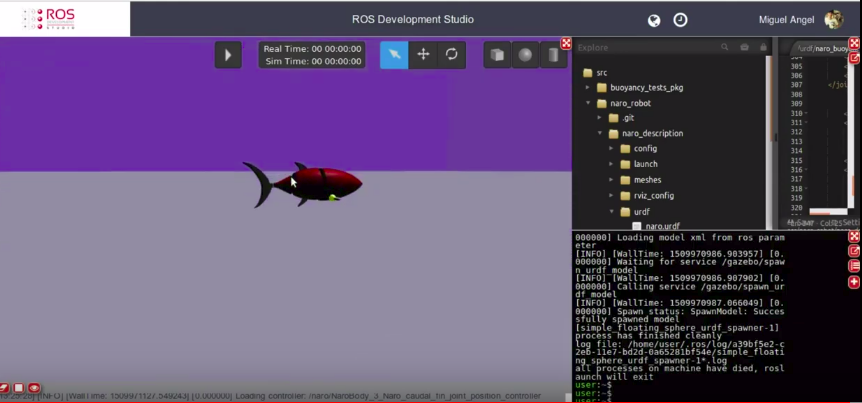
Now we are going to dive deeper into how to calculate the buoyancy for a more complex robot like a simulated fish. For that, we launch the main_submarines.launch located in the buoyancy_tests_pkg package mentioned in the previous post. If you launched correctly, you should have a simulation like the one below:
fish with buoyancy in ROSDS
The geometric buoyancy version of the fish is the one in the naro_geometric_buoyancy.urdf.sdf file, which has the following content:
<robot name="naro">

    <material name="blue">
        <color rgba="0 0 0.8 1"/>
    </material>
    <material name="red">
        <color rgba="0.8 0 0 1"/>
    </material>
    <material name="green">
        <color rgba="0 0.8 0 1"/>
    </material>
    <material name="purple">
        <color rgba="0.8 0 0.8 1"/>
    </material>

    <gazebo>
        <plugin name="gazebo_ros_control" filename="libgazebo_ros_control.so">
        </plugin>
    </gazebo>

	<!-- * * * Link Definitions * * * -->
    <link name="base_link">
 	    <inertial>
            <origin xyz="0 0 0" rpy="0 0 0"/>
            <mass value="1.37616837872" />
            <inertia ixx="0.00393997006828" ixy="0.0" ixz="0.0" iyy="0.00393997006828" iyz="0.0" izz="0.00186057964803"/>
        </inertial>
        <collision>
            <origin rpy="0.0 0 0" xyz="0 0 0"/>
            <geometry>
                <cylinder radius="0.052" length="0.162"/>
            </geometry>
        </collision>
        <visual>
            <origin rpy="0.0 0 0" xyz="0 0 0"/>
            <geometry>
                <cylinder radius="0.052" length="0.162"/>
            </geometry>
            <material name="red"/>
        </visual>
	</link>

    <gazebo reference="base_link">
        <kp>1000000.0</kp>
        <kd>1000000.0</kd>
        <mu1>10.0</mu1>
        <mu2>10.0</mu2>
        <material>Gazebo/Red</material>
    </gazebo>

    <link name="NaroBody_2_link">
 	    <inertial>
            <origin xyz="0 0 0.0362" rpy="0 0 0"/>
            <mass value="0.605368047943" />
            <inertia ixx="0.000667233852526" ixy="0.0" ixz="0.0" iyy="0.000667233852526" iyz="0.0" izz="0.000805602035221"/>
        </inertial>
        <collision>
            <origin xyz="0 0 0.0362" rpy="0 0 0"/>
            <geometry>
                <cylinder radius="0.05159" length="0.0724"/>
            </geometry>
        </collision>
        <visual>
            <origin xyz="0 0 0.0362" rpy="0 0 0"/>
            <geometry>
                <cylinder radius="0.05159" length="0.0724"/>
            </geometry>
            <material name="blue"/>
        </visual>
	</link>
    <!-- This is for color and physical properties in Gazebo, color won't work with the material tag in gazebo
    only for URDF coloring -->
    <gazebo reference="NaroBody_2_link">
        <kp>1000000.0</kp>
        <kd>1000000.0</kd>
        <mu1>10.0</mu1>
        <mu2>10.0</mu2>
        <material>Gazebo/Blue</material>
    </gazebo>

    <joint name="NaroBody_1_NaroBody_2_joint" type="revolute">
    	<parent link="base_link"/>
    	<child link="NaroBody_2_link"/>
        <origin xyz="0 0 0.096" rpy="0 0 0"/>
        <limit lower="-0.2" upper="0.2" effort="10.0" velocity="1.0"/>
        <axis xyz="1 0 0"/>
	</joint>

    <transmission name="tran1">
        <type>transmission_interface/SimpleTransmission</type>
        <joint name="NaroBody_1_NaroBody_2_joint">
            <hardwareInterface>EffortJointInterface</hardwareInterface>
        </joint>
        <actuator name="motor1">
            <hardwareInterface>EffortJointInterface</hardwareInterface>
            <mechanicalReduction>1</mechanicalReduction>
        </actuator>
    </transmission>

    <link name="NaroBody_3_link">
 	    <inertial>
            <origin xyz="0 0 0.0267885" rpy="0 0 0"/>
            <mass value="0.137706811701" />
            <inertia ixx="6.1101464537e-05" ixy="0.0" ixz="0.0" iyy="6.1101464537e-05" iyz="0.0" izz="5.63390256449e-05"/>
        </inertial>
        <collision>
            <origin xyz="0 0 0.0267885" rpy="0 0 0"/>
            <geometry>
                <cylinder radius="0.028605" length="0.05357"/>
            </geometry>
        </collision>
        <visual>
            <origin xyz="0 0 0.0267885" rpy="0 0 0"/>
            <geometry>
                <cylinder radius="0.028605" length="0.05357"/>
            </geometry>
            <material name="green"/>
        </visual>
	</link>
    <!-- This is for color and physical properties in Gazebo, color won't work with the material tag in gazebo
    only for URDF coloring -->
    <gazebo reference="NaroBody_3_link">
        <kp>1000000.0</kp>
        <kd>1000000.0</kd>
        <mu1>10.0</mu1>
        <mu2>10.0</mu2>
        <material>Gazebo/Green</material>
    </gazebo>

    <joint name="NaroBody_2_NaroBody_3_joint" type="revolute">
    	<parent link="NaroBody_2_link"/>
    	<child link="NaroBody_3_link"/>
        <origin xyz="0 0 0.0874" rpy="0 0 0"/>
        <limit lower="-0.2" upper="0.2" effort="5.0" velocity="1.0"/>
        <axis xyz="1 0 0"/>
	</joint>

    <transmission name="tran2">
        <type>transmission_interface/SimpleTransmission</type>
        <joint name="NaroBody_2_NaroBody_3_joint">
            <hardwareInterface>EffortJointInterface</hardwareInterface>
        </joint>
        <actuator name="motor2">
            <hardwareInterface>EffortJointInterface</hardwareInterface>
            <mechanicalReduction>1</mechanicalReduction>
        </actuator>
    </transmission>


    <link name="Naro_caudal_fin_link">
 	    <inertial>
            <origin xyz="0 0.07 0" rpy="0 0 0"/>
            <mass value="0.0923628240155" />
            <inertia ixx="0.000113421547891" ixy="0.0" ixz="0.0" iyy="0.000113421547891" iyz="0.0" izz="0.000226288918838"/>
        </inertial>
        <collision>
            <origin xyz="0 0.07 0" rpy="0 0 0"/>
            <geometry>
                <cylinder radius="0.07" length="0.006"/>
            </geometry>
        </collision>
        <visual>
            <origin xyz="0 0.07 0" rpy="0 0 0"/>
            <geometry>
                <cylinder radius="0.07" length="0.006"/>
            </geometry>
            <material name="purple"/>
        </visual>
	</link>
    <!-- This is for color and physical properties in Gazebo, color won't work with the material tag in gazebo
    only for URDF coloring -->
    <gazebo reference="Naro_caudal_fin_link">
        <kp>1000000.0</kp>
        <kd>1000000.0</kd>
        <mu1>10.0</mu1>
        <mu2>10.0</mu2>
        <material>Gazebo/Purple</material>
    </gazebo>

    <joint name="NaroBody_3_Naro_caudal_fin_joint" type="revolute">
    	<parent link="NaroBody_3_link"/>
    	<child link="Naro_caudal_fin_link"/>
        <origin xyz="0 0 0.05357" rpy="1.5707963267948966 0 0"/>
        <limit lower="-0.2" upper="0.2" effort="5.0" velocity="1.0"/>
        <axis xyz="1 0 0"/>
	</joint>

    <transmission name="tran3">
        <type>transmission_interface/SimpleTransmission</type>
        <joint name="NaroBody_3_Naro_caudal_fin_joint">
            <hardwareInterface>EffortJointInterface</hardwareInterface>
        </joint>
        <actuator name="motor3">
            <hardwareInterface>EffortJointInterface</hardwareInterface>
            <mechanicalReduction>1</mechanicalReduction>
        </actuator>
    </transmission>


    <link name="Naro_pectoral_fin_right_link">
 	    <inertial>
            <origin xyz="0 0 0" rpy="0 0 0"/>
            <mass value="0.005272596" />
            <inertia ixx="1.66514662741e-06" ixy="0.0" ixz="0.0" iyy="1.58601814294e-06" iyz="0.0" izz="1.1076406047e-07"/>
        </inertial>
        <collision>
            <origin xyz="0 0 0" rpy="0 0 0"/>
            <geometry>
                <box size="0.006 0.0147 0.05978" />
            </geometry>
        </collision>
        <visual>
            <origin xyz="0 0 0" rpy="0 0 0"/>
            <geometry>
                <box size="0.006 0.0147 0.05978" />
            </geometry>
            <material name="purple"/>
        </visual>
	</link>
    <!-- This is for color and physical properties in Gazebo, color won't work with the material tag in gazebo
    only for URDF coloring -->
    <gazebo reference="Naro_pectoral_fin_right_link">
        <kp>1000000.0</kp>
        <kd>1000000.0</kd>
        <mu1>10.0</mu1>
        <mu2>10.0</mu2>
        <material>Gazebo/Purple</material>
    </gazebo>

    <joint name="NaroBody_1_Naro_pectoral_fin_right_joint" type="revolute">
    	<parent link="base_link"/>
    	<child link="Naro_pectoral_fin_right_link"/>
        <origin xyz="-0.04275 -0.05489 0.04478" rpy="1.5707963267948966 0 0"/>
        <limit lower="-0.2" upper="0.2" effort="0.1" velocity="0.5"/>
        <axis xyz="0 0 1"/>
	</joint>

    <transmission name="tran4">
        <type>transmission_interface/SimpleTransmission</type>
        <joint name="NaroBody_1_Naro_pectoral_fin_right_joint">
            <hardwareInterface>EffortJointInterface</hardwareInterface>
        </joint>
        <actuator name="motor4">
            <hardwareInterface>EffortJointInterface</hardwareInterface>
            <mechanicalReduction>1</mechanicalReduction>
        </actuator>
    </transmission>


    <link name="Naro_pectoral_fin_left_link">
 	    <inertial>
            <origin xyz="0 0 0" rpy="0 0 0"/>
            <mass value="0.005272596" />
            <inertia ixx="1.66514662741e-06" ixy="0.0" ixz="0.0" iyy="1.58601814294e-06" iyz="0.0" izz="1.1076406047e-07"/>
        </inertial>
        <collision>
            <origin xyz="0 0 0" rpy="0 0 0"/>
            <geometry>
                <box size="0.006 0.0147 0.05978" />
            </geometry>
        </collision>
        <visual>
            <origin xyz="0 0 0" rpy="0 0 0"/>
            <geometry>
                <box size="0.006 0.0147 0.05978" />
            </geometry>
            <material name="purple"/>
        </visual>
	</link>
    <!-- This is for color and physical properties in Gazebo, color won't work with the material tag in gazebo
    only for URDF coloring -->
    <gazebo reference="Naro_pectoral_fin_left_link">
        <kp>1000000.0</kp>
        <kd>1000000.0</kd>
        <mu1>10.0</mu1>
        <mu2>10.0</mu2>
        <material>Gazebo/Purple</material>
    </gazebo>

    <joint name="NaroBody_1_Naro_pectoral_fin_left_joint" type="revolute">
    	<parent link="base_link"/>
    	<child link="Naro_pectoral_fin_left_link"/>
        <origin xyz="-0.04275 0.05489 0.04478" rpy="1.5707963267948966 0 0"/>
        <limit lower="-0.2" upper="0.2" effort="0.1" velocity="0.5"/>
        <axis xyz="0 0 1"/>
	</joint>

    <transmission name="tran5">
        <type>transmission_interface/SimpleTransmission</type>
        <joint name="NaroBody_1_Naro_pectoral_fin_left_joint">
            <hardwareInterface>EffortJointInterface</hardwareInterface>
        </joint>
        <actuator name="motor5">
            <hardwareInterface>EffortJointInterface</hardwareInterface>
            <mechanicalReduction>1</mechanicalReduction>
        </actuator>
    </transmission>


    <link name="Naro_dorsal_fin_up_link">
 	    <inertial>
            <origin xyz="0 0 0" rpy="0 0 0"/>
            <mass value="0.005272596" />
            <inertia ixx="1.66514662741e-06" ixy="0.0" ixz="0.0" iyy="1.58601814294e-06" iyz="0.0" izz="1.1076406047e-07"/>
        </inertial>
        <collision>
            <origin xyz="0 0 0" rpy="0 0 0"/>
            <geometry>
                <box size="0.006 0.0147 0.05978" />
            </geometry>
        </collision>
        <visual>
            <origin xyz="0 0 0" rpy="0 0 0"/>
            <geometry>
                <box size="0.0147 0.006 0.05978" />
            </geometry>
            <material name="purple"/>
        </visual>
	</link>

	<gazebo reference="Naro_dorsal_fin_up_link">
        <kp>1000000.0</kp>
        <kd>1000000.0</kd>
        <mu1>10.0</mu1>
        <mu2>10.0</mu2>
        <material>Gazebo/Purple</material>
    </gazebo>

    <joint name="NaroBody_1_Naro_dorsal_fin_up_joint" type="fixed">
        <parent link="NaroBody_2_link"/>
        <child link="Naro_dorsal_fin_up_link"/>
        <origin xyz="0.035795 0 0.0362" rpy="0 1.5707963267948966 0"/>
    </joint>


        <link name="Naro_dorsal_fin_down_link">
 	    <inertial>
            <origin xyz="0 0 0" rpy="0 0 0"/>
            <mass value="0.005272596" />
            <inertia ixx="1.66514662741e-06" ixy="0.0" ixz="0.0" iyy="1.58601814294e-06" iyz="0.0" izz="1.1076406047e-07"/>
        </inertial>
        <collision>
            <origin xyz="0 0 0" rpy="0 0 0"/>
            <geometry>
                <box size="0.006 0.0147 0.05978" />
            </geometry>
        </collision>
        <visual>
            <origin xyz="0 0 0" rpy="0 0 0"/>
            <geometry>
                <box size="0.0147 0.006 0.05978" />
            </geometry>
            <material name="purple"/>
        </visual>
	</link>

	<gazebo reference="Naro_dorsal_fin_down_link">
        <kp>1000000.0</kp>
        <kd>1000000.0</kd>
        <mu1>10.0</mu1>
        <mu2>10.0</mu2>
        <material>Gazebo/Purple</material>
    </gazebo>

    <joint name="NaroBody_1_Naro_dorsal_fin_down_joint" type="fixed">
        <parent link="NaroBody_2_link"/>
        <child link="Naro_dorsal_fin_down_link"/>
        <origin xyz="-0.035795 0 0.0362" rpy="0 1.5707963267948966 0"/>
    </joint>

    <gazebo>
        <plugin name="buoyancy_sphere" filename="libBuoyancyPlugin.so">
          <fluid_density>1000</fluid_density>
        </plugin>
    </gazebo>

</robot>
To calculate the volume of a robot with a complex shape we used Blender, by importing the .dae file as explained in this video: https://youtu.be/evweU2MjNjc?t=384
We would ask you to see the video on Youtube now because there it is better to explain how we deal with Blender. If you liked the post and the video, please consider subscribing to our channel so that you can be constantly learning, given that we publish new videos every day.
Thanks for watching and Keep Pushing your ROS Learning.
By watching the video, you can see the robot still rotates after calculating the volume using a 3D shape. Please consider checking the other post to understand how to make the robot stablish: https://www.theconstruct.ai/ros-tutorials-068-buoyancy-neutral-object-goes-hydrodynamics-plugin-part-3/
And below we have the video related to this post:
Here we show where the ROS Params are dumped when we use the “system()” function in C++ , as asked on this question: https://answers.ros.org/question/267467/yaml-dump-using-c/
Q: How do i dump my param values into a yaml file using C++? I tried system(“rosparam dump example.yaml”); but no luck..
A: ROS Params are dumped at the working directory unless you pass the /full/path/to/dump.yaml as argument, like: rosparam dump /full/path/to/dump.yaml
Q: I copied a workspace and now catkin_make doesn’t work
A: I’m using ROS Indigo distribution, I have tried to do the same in my computer and I got the following error:
Then, I have removed the folders build and devel from catkin_02 and tried to compile again. It worked!
I don’t think the compilation problem is related to that, but it’s also important to remove any source catkin_01/devel/setup.bash instruction (maybe you have added to your .bashrc file)



![[ROS Q&A] 069 – RQT Custom Plugin: undefined symbol](https://www.theconstruct.ai/wp-content/uploads/2017/11/RQT-Custom-Plugin-undefined-symbol-screen.png)
![[ROS Q&A] 067 – Subscribe custom message attributes](https://www.theconstruct.ai/wp-content/uploads/2017/11/ROS-QA-Subscribe-custom-message-attributes-screen.png)
![[ROS Q&A] 066 – buoyancy neutral object goes up with hydrodynamics plugin part2](https://www.theconstruct.ai/wp-content/uploads/2017/11/buoyancy-neutral-object-goes-up-with-hydrodynamics-plugin-part2.png)
![[ROS Q&A] 065 – YAML dump using C++](https://www.theconstruct.ai/wp-content/uploads/2017/11/YAML-dump-using-C.png)
![[ROS Q&A] Catkin workspaces – Problem copying files from one to another](https://www.theconstruct.ai/wp-content/uploads/2017/11/ROS-QA-Catkin-workspaces-Problem-copying-files-from-one-to-another.png)