SoftBank Corp. is a Japanese telecom operator, a core company of SoftBank group.
We talk to Tadashi Imokawa, an engineer at SoftBank Corp. in charge of the hardware and software development of the company’s robots, Tomohiko Furutani manager of the AI robot development team about their necessity of learning ROS for robotics, and how they and their team are learning difficult ROS subjects.
Is it both of you that are learning ROS?
Imokawa: Well, we already know ROS, I mean, we know how to do subscribers, create nodes, call action servers… However, sometimes we need to know how a very specific part of ROS works, like for example, how to use a manipulator. In that case, we need to use your academy to learn those subjects.
Why are you learning ROS?
Furutani: We want to make extensive usage of ROS in our robots.
Which ROS methods have you tried?
Imokawa: We used general ROS books. Also, the official ROS wiki page provided by ros.org and we dedicated a lot of time to read the code on the gits of different developers. Learning that way is the traditional way, and it is sometimes very complicated.
Furutani: We also used some subscription services like PackT which provide a lot of books about the subject.
Why do you think those learning methods are complicated?
Imokawa: Because in order to do tests of what we learn, we need to set up a full development environment. That takes time and is complicated. Furthermore, sometimes, it doesn’t work correctly (what you are supposed to obtain and what you actually obtain). It takes a lot of time
Furutani: Yes the testing environment itself takes time, and that sometimes can be very frustrating.
Why did you choose to learn with Robot Ignite Academy?
Imokawa: Well, your academy has some basic and intermediate courses about subjects that we already master. But for more complicated subjects we cannot find much information on the internet, but you have interesting courses teaching those subjects.
Furutani: Also you provide an already working environment for those complicated subjects. When you want to test a complicated ROS subject, you need to have a lot of preparation (complex simulations running, complex code and instructions). Your academy already provides all that ready to start learning.
What are you missing at Robot Ignite Academy?
Imokawa: We feel your service is kind of laggy, specially when we use graphical tools on the web browser.
Furutani: It is probably because we are in Japan and we are far from your servers in Europe.
(By the time this interview is published, Robot Ignite Academy has established a system of replicated academies around the globe for different zones, in order to solve the problem of latency. We have reduced an 83% the latency in countries like Japan, Australia and San Francisco).
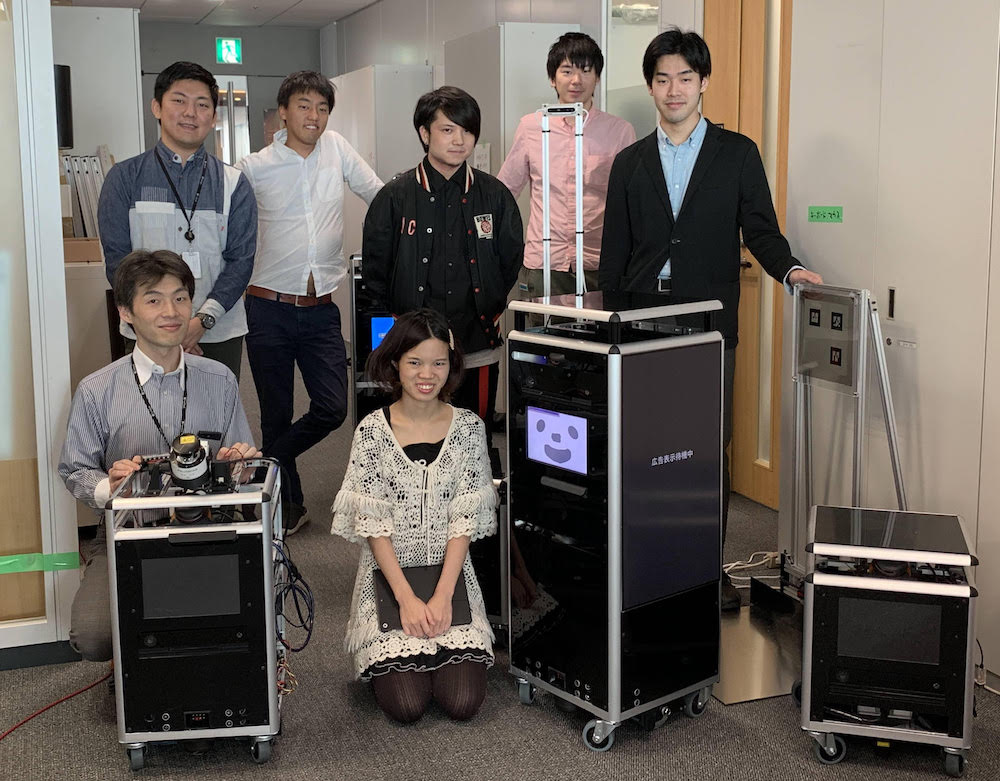
SoftBank team with ROS prototype robots
Which ROS subjects are you interested in?
Imokawa: We are specially interesting at ROS Navigation and ROS Manipulation, mainly indoor navigation.
Which computer type (O.S.) are you using to learn ROS?
Furutani: We use Linux Ubuntu machines for programming. But due to security issues, for the learning, we are using Windows computers.
Have you applied what you learned to real robots? Which ones?
Furutani: Not yet. We are still in the process of learning and identifying where to apply it. We are expecting some results in the close future
Thank you for your time!
And for all of you reading this case study, consider the amount of time you will save if you use the Robot Ignite Academy to train your engineers on ROS based robotics. We have courses for learning the basics of ROS, but we also have more advanced courses that teach how to apply it to self-driving cars, drones, deep learning with robots, Reinforcement Learning applied to ROS robots, industrial robots and many more. Just check our current list of courses on this page and give it a free try.
Other companies that use our academy to train their teams
This video shows you how to spawn cassie robot in gazebo fully actuated, ready for calibrating the PID and joints limits. This is an answer to the question in ROS ANSWERS: https://goo.gl/N9pcLA
In the following video, we are going to show how to use the OpenAI baselines (specifically the deepq algorithm) with ROS in order to train your environments.
In this ROSject link you can have and test the project with a single click
—
Feedback
—
Did you like this video? Do you have questions about what is explained? Whatever the case, please leave a comment on the comments section below, so we can interact and learn from each other.
If you want to learn about other ROS topics, please let us know on the comments area and we will do a video about it.
— Feedback
—
Did you like this video? Do you have questions about what is explained? Whatever the case, please leave a comment on the comments section below, so we can interact and learn from each other.
If you want to learn about other ROS topics, please let us know on the comments area and we will do a video about it.
Use the ROS Development Studio (ROSDS), an online platform for developing for ROS within a PC browser. Easy-peasy. I’m using this option for this post.
Once you log in, click on the New ROSject button to create a project that will host your code. Then Click on Open ROSject to launch the development/simulation environment.
To open a “terminal” on ROSDS, pick the Shellapp from the Tools menu.
You can find the IDE app on the Tools menu.
You have ROS installed on a local PC. Okay, skip to Step 2.
Next step!
Step 2: Create a package as specified in the question to reproduce the problem
1. If you are working on ROSDS, please create a ROSject first, as indicated above.
2. Open a terminal and create a package:
user:~$ cd catkin_ws/src
user:~/catkin_ws/src$ catkin_create_pkg custom_msg rospy roscpp
Created file custom_msg/CMakeLists.txt
Created file custom_msg/package.xml
Created folder custom_msg/include/custom_msg
Created folder custom_msg/src
Successfully created files in /home/user/catkin_ws/src/custom_msg. Please adjust the values in package.xml.
3. Create a custom message
user:~/catkin_ws/src$ cd custom_msg/
user:~/catkin_ws/src/custom_msg$ mkdir -p msg
user:~/catkin_ws/src/custom_msg$ cd msg
user:~/catkin_ws/src/custom_msg/msg$ touch my_msg.msg
user:~/catkin_ws/src/custom_msg/msg$
4. Open the IDE and paste the following into my_msg.msg:
home/user/catkin_ws/src/custom_msg/src/custom_msg.cpp:1:31: fatal error: custom_msg/my_msg.h: No such file or directory
compilation terminated.
Done here. We are able to reproduce the error. Now let’s fix it.
Step 3: Fix the problem and rejoice!
The above error says it cannot find the header file while building the C++ source. This is because we have not specified that this header file is a dependency and should be built first.
Add the following line to the build section of CMakeLists.txt (under the lines added earlier). The format is add_dependencies(source_file_name package_name_generate_messages_cpp).
Here below you have a “sights and sounds” version of this post, just in case you prefer it that way. Enjoy!
Feedback
Did you like this post? Do you have any questions about the explanations? Whatever the case, please leave a comment on the comments section below, so we can interact and learn from each other.
If you want to learn about other ROS or ROS2 topics, please let us know in the comments area and we will do a video or post about it.

![[ROS Q&A] 167 – Test Stereo Camera in ROS](https://www.theconstruct.ai/wp-content/uploads/2018/11/ROS-QA-167-Test-Stereo-Camera-in-ROS.jpg)



![[ROS Q&A] 166 – Spawn Cassie Robot in Gazebo](https://www.theconstruct.ai/wp-content/uploads/2018/11/ROS-QA-166-Spawn-Cassie-Robot-in-Gazebo.jpg)
![[ROS Q&A] 165 – How to use OpenAI baselines with ROS](https://www.theconstruct.ai/wp-content/uploads/2018/11/ROS-QA-165-How-to-use-OpenAI-baselines-with-ROS.jpg)
![[ROS Q&A] 164 – Create a new topic](https://www.theconstruct.ai/wp-content/uploads/2018/11/ROS-QA-164-Create-a-new-topic.jpg)
![[ROS Q&A] 163 – Custom message fails to build: No such file or directory](https://www.theconstruct.ai/wp-content/uploads/2018/11/ROS-QA-163-Custom-message-fails-to-build-No-such-file-or-directory.jpg)