About:
In this video, you are going to learn how to connect to the real Vector ROBOT through ROSDS using the real robot connection tools. You will also use a docker created by betaB0t to connect to VECTOR.
Here you can find the list of materials that you will need for this session:
Vector Robot: https://www.amazon.es/Anki-000-0079-Vector/dp/B078T42JCM
Vector Robot Playing Space ( recommended to avoid any problems with flying Vectors :P): https://www.amazon.es/Anki-000-0078-Habitat-Vector-Space/dp/B07G3QSX8G
———————————————————————————
Music:
Original Track:https://youtu.be/FBv6rm1lY0w
Thanks to NewRetroWave for letting us use their music.
Here more info:
New Retro Wave + Bachelor of Hearts Aurora Borealis
Smooth vibes for you retro soul. Listen and enjoy.
OUT NOW on NRW Records:
https://newretrowave.bandcamp.com/album/a-cosmic-funk-odyssey-ep
iTunes: http://apple.co/2r6N1T7
Support:
https://www.facebook.com/BachelorOfHeartsmusic/
Artwork provided by Murryous, who is our featured artist for May. Please support him:
https://www.instagram.com/murryous/
———————————————————————————
3D Models:
Orange Robot:
https://www.blendswap.com/blends/view/77718
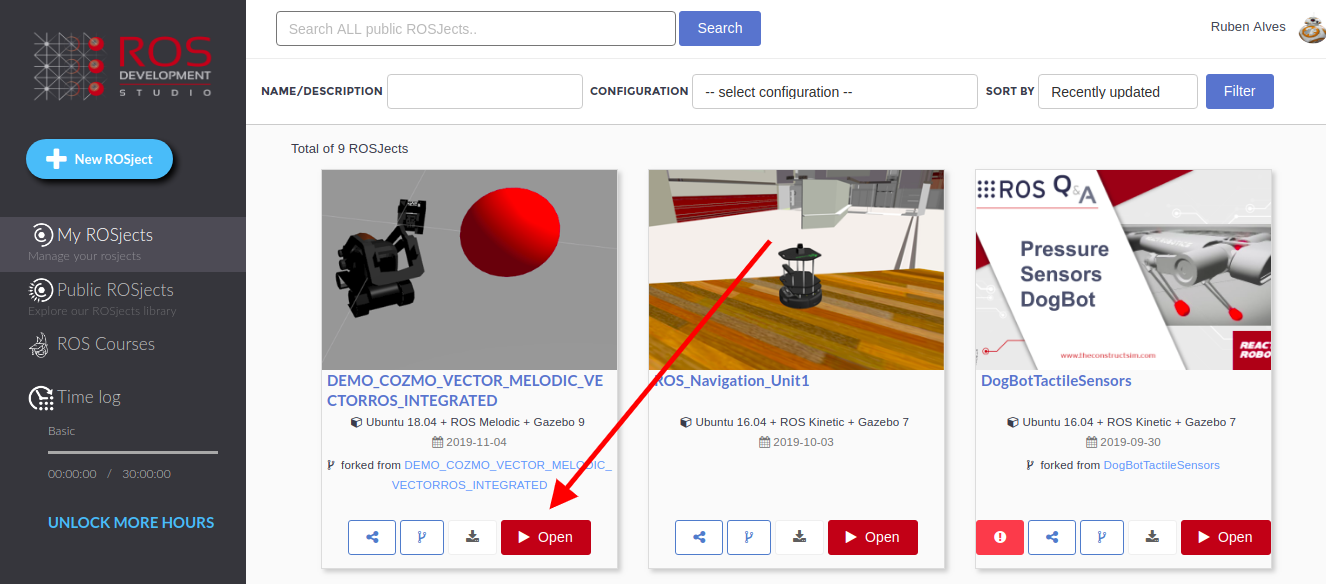
If you click in the ROSject provided above (http://www.rosject.io/l/908ce19/), you will get a copy of it on ROSDS (ROS Development Studio)
To launch it, you first need to open the ROSject clicking on the Open button.
Open Cozmo and Vector robots in ROSDS
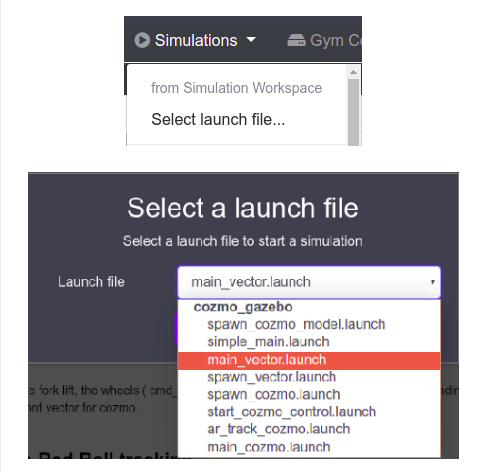
Once the ROSject open, you just launch the simulation by clicking Simulations–>Select Launch File, then you select cozmo_gazebo main_cozmo.launch
Launch cozmo_gazebo main_vector.launch in ROSDS
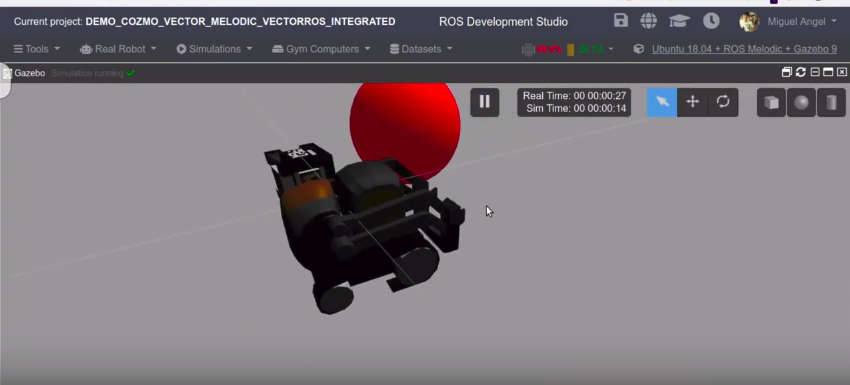
If everything went ok, now you should have the simulation up and running:
cozmo vector running in ROSDS
You can launch cozmo and vector just by choosing between the main_vector.launch and main_cozmo.launch
You can access the camera, the forklift, the wheels (through the /cmd_vel ROS Topic), imu and the Infra-Red sensors form their corresponding topics. All the topics have the exact same name in the two different robots, except that you have to change the word vector for cozmo.
Launching the Simple Red Ball tracking
To do so you have to launch the simulation you want, in this case, we will launch the Vector simulation as described in the previous section.
Then open a Webshell from the Tools Bar (Tools -> Shell), and execute the following commands:
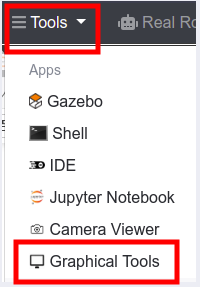
You should then Open the Graphical Tools from the Tools menu to see the RedBall detection Gui:
Launching Graphical Tools in ROSDS
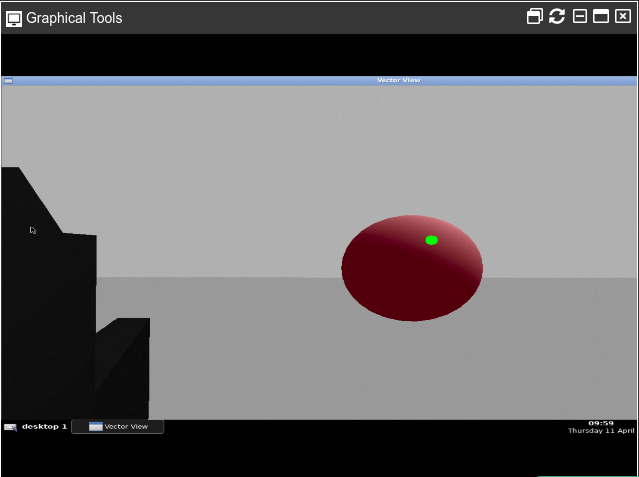
You should then be able to see the robot camera:
redball seen by cozmo and vector in ROSDS
If you now move the ball around with the move object icon of the 3D view, you can see how Vector follows the ball. You can also move the ball with the keyboard, which will send absolute position commands to the ball. You first need to run the launch file below:
roslaunch cozmo_gazebo move_redball.launch
Then use the Keys below:
“i“=+X Axis,
“k“=STOP,
“j“=-Y Axis,
“l“=+Y Axis,
“,“=-X Axis:
Moving the robot around
With the ball tracking enabled, you can move the robot around using the command below in the web shell:
To see the IMU of the robot, you can see the /imu topic using the command below:
rostopicecho/imu
Current known issues
We noticed that there is a drift that occurs when Vector or Cozmo is still.
SPECIAL THANKS:
Our special thanks to beat_b0t for creating the Vector_ROS package.
Also, thanks to TheConstructSim For creating the COZMO and Vector simulation package. and thanks to ANKI for creating COZMO and VECTOR real robots that we can use to play around and learn more about robotics.
Youtube Video
We hope you like the post. If you prefer, we also have a live version of this post in YouTube. You can find it in the link below. If you like it, please consider subscribing to our channel on youTube. We are constantly adding new ROS-related content.
———————————————————————————
Music:
Original Track:https://youtu.be/FBv6rm1lY0w
Thanks to NewRetroWave for letting us use their music.
Here more info:
New Retro Wave + Bachelor of Hearts Aurora Borealis
Smooth vibes for you retro soul. Listen and enjoy.
OUT NOW on NRW Records:
https://newretrowave.bandcamp.com/album/a-cosmic-funk-odyssey-ep
iTunes: http://apple.co/2r6N1T7
Support:
https://www.facebook.com/BachelorOfHeartsmusic/
Artwork provided by Murryous, who is our featured artist for May. Please support him:
https://www.instagram.com/murryous/
———————————————————————————
3D Models:
Orange Robot:
https://www.blendswap.com/blends/view/77718
About:
In this video we will learn how to setup your local computer to use the Vector SDK to execute your own custom programs to
play with VECTOR. Access all the VECTOR API with 3 simple steps in Ubuntu 16
———————————————————————–
Install SDK in ALL OS:
https://developer.anki.com/vector/docs/initial.html
Setup Script fro Vector in Local computer:
https://bitbucket.org/theconstructcore/morpheus_chair/src/master/vector_scripts/01_how_to_setup_vector_sdk.py
———————————————————————–
Here you can find the list of materials that you will need for this session:
Vector Robot: https://www.amazon.es/Anki-000-0079-Vector/dp/B078T42JCM
Vector Robot Playing Space ( reccomended to avoid any problems with flying Vectors :P): https://www.amazon.es/Anki-000-0078-Habitat-Vector-Space/dp/B07G3QSX8G
———————————————————————————
Music:
Original Track:https://youtu.be/FBv6rm1lY0w
Thanks to NewRetroWave for letting us use their music.
Here more info:
New Retro Wave + Bachelor of Hearts Aurora Borealis
Smooth vibes for you retro soul. Listen and enjoy.
OUT NOW on NRW Records:
https://newretrowave.bandcamp.com/album/a-cosmic-funk-odyssey-ep
iTunes: http://apple.co/2r6N1T7
Support:
https://www.facebook.com/BachelorOfHeartsmusic/
Artwork provided by Murryous, who is our featured artist for May. Please support him:
https://www.instagram.com/murryous/
Hang Ups (Want You) 4:04 Otis McDonald Hip hop y rap | Dramática
Puedes usar esta canción en cualquiera de tus vídeos.
Local Elevator de Kevin MacLeod está sujeta a una licencia de Creative Commons Attribution (https://creativecommons.org/licenses/by/4.0/)
Fuente: http://incompetech.com/music/royalty-free/index.html?isrc=USUAN1300012
Artista: http://incompetech.com/
▬▬▬▬▬▬▬▬▬▬▬▬▬▬▬▬▬▬▬
No Copyright Motion Graphics
Motion Graphics provided by https://www.youtubestock.com
YouTube Channel: https://goo.gl/aayJRf
▬▬▬▬▬▬▬▬▬▬▬▬▬▬▬▬▬▬▬
3D Models:
Orange Robot:
https://www.blendswap.com/blends/view/77718
About:
In this video we start a new video series which will revolve around Deep learning (thanks for the amazing support you gave to the youtube poll asking this ).
We will use Vector robot from ANKI as platform to execute our own projects, due to its ease of use and robustness. Its also a very cheap robot for the amazing spech you get.
We will unbox it and compare it with the OLD COZMO. Stay to the end because we have recorded some nice Vector with COZMO play.
———————————————————————–
Here you can find the list of materials that you will need for this session:
Vector Robot: https://www.amazon.es/Anki-000-0079-Vector/dp/B078T42JCM
Vector Robot Playing Space ( reccomended to avoid any problems with flying Vectors :P): https://www.amazon.es/Anki-000-0078-Habitat-Vector-Space/dp/B07G3QSX8G
———————————————————————————
Music:
Original Track:https://youtu.be/FBv6rm1lY0w
Thanks to NewRetroWave for letting us use their music.
Here more info:
New Retro Wave + Bachelor of Hearts Aurora Borealis
Smooth vibes for you retro soul. Listen and enjoy.
OUT NOW on NRW Records:
https://newretrowave.bandcamp.com/album/a-cosmic-funk-odyssey-ep
iTunes: http://apple.co/2r6N1T7
Support:
https://www.facebook.com/BachelorOfHeartsmusic/
Artwork provided by Murryous, who is our featured artist for May. Please support him:
https://www.instagram.com/murryous/
Hang Ups (Want You) 4:04 Otis McDonald Hip hop y rap | Dramática
Puedes usar esta canción en cualquiera de tus vídeos.
Local Elevator de Kevin MacLeod está sujeta a una licencia de Creative Commons Attribution (https://creativecommons.org/licenses/by/4.0/)
Fuente: http://incompetech.com/music/royalty-free/index.html?isrc=USUAN1300012
Artista: http://incompetech.com/
———————–
Want to use this video? You must put this in your video description:
▬▬▬▬▬▬▬▬▬▬▬▬▬▬▬▬▬▬▬
No Copyright Motion Graphics
Motion Graphics provided by https://www.youtubestock.com
YouTube Channel: https://goo.gl/aayJRf
▬▬▬▬▬▬▬▬▬▬▬▬▬▬▬▬▬▬▬
3D Models:
Orange Robot:
https://www.blendswap.com/blends/view/77718
About:
In this extra video, we run the first AgentSmith Awards and show you how to connect in less than
5minutes to the Robots ROS system with ROS Development Studio, with just a few clicks.
———————————————————————–
Chris Macier Facebook:
https://www.facebook.com/cwmacier
SmithAgent Model:
If you have been awarded one you have the right to print it and brag around internet ;).
https://www.thingiverse.com/thing:2282086
———————————————————————————
Music:
Original Track:https://youtu.be/FBv6rm1lY0w
Thanks to NewRetroWave for letting us use their music.
Here more info:
New Retro Wave + Bachelor of Hearts Aurora Borealis
Smooth vibes for you retro soul. Listen and enjoy.
OUT NOW on NRW Records:
https://newretrowave.bandcamp.com/album/a-cosmic-funk-odyssey-ep
iTunes: http://apple.co/2r6N1T7
Support:
https://www.facebook.com/BachelorOfHeartsmusic/
Artwork provided by Murryous, who is our featured artist for May. Please support him:
https://www.instagram.com/murryous/
About:
This is the last video of this RaspBerryPi RGB camera robot. In this video, we talk about the
code modifications were done to the line follower to adapt it to the real robot needs and limitations.
We also so the setup for the camera. And finally, we see a demonstration of how it performs.
We also ask YOU PEOPLE which new project we could work on next! Any suggestions?
———————————————————————–
———————————————————————————
Usefull links:
ROSJECT: Project with all the code one click away:http://www.rosject.io/l/8292943/
Here you can find the list of materials that you will need for this session:
Camera Mount: https://www.amazon.es/gp/product/B075KPLSG1
Servo Mount: https://www.amazon.es/KINGDUO-Soporte-Manipulador-Robótico-Mount-Negro/dp/B07M8LSVMY
Industrial Velcro: https://www.amazon.es/VELCRO-VEL-EC60241-Cinta-adhesiva-fuerte/dp/B00186Q9AK
9V Battery: https://www.amazon.es/Energizer-201537-Pila-6LR61-6LF22
9V Battery Support+Connector: https://www.amazon.es/Ils-Battery-Storage-Container-Holder/dp/B0768DJTL7
Want to learn more about how to Rosify a robot:
https://www.robotigniteacademy.com/en/course/building-and-rosifying-robot-scratch/details/
———————————————————————————
Music:
Original Track:https://youtu.be/FBv6rm1lY0w
Thanks to NewRetroWave for letting us use their music.
Here more info:
New Retro Wave + Bachelor of Hearts Aurora Borealis
Smooth vibes for you retro soul. Listen and enjoy.
OUT NOW on NRW Records:
https://newretrowave.bandcamp.com/album/a-cosmic-funk-odyssey-ep
iTunes: http://apple.co/2r6N1T7
Support:
https://www.facebook.com/BachelorOfHeartsmusic/
Artwork provided by Murryous, who is our featured artist for May. Please support him:
https://www.instagram.com/murryous/
Hang Ups (Want You) 4:04 Otis McDonald Hip hop y rap | Dramática
Puedes usar esta canción en cualquiera de tus vídeos.
Local Elevator de Kevin MacLeod está sujeta a una licencia de Creative Commons Attribution (https://creativecommons.org/licenses/by/4.0/)
Fuente: http://incompetech.com/music/royalty-free/index.html?isrc=USUAN1300012
Artista: http://incompetech.com/
———————–
▬▬▬▬▬▬▬▬▬▬▬▬▬▬▬▬▬▬▬
No Copyright Motion Graphics
Motion Graphics provided by https://www.youtubestock.com
YouTube Channel: https://goo.gl/aayJRf
▬▬▬▬▬▬▬▬▬▬▬▬▬▬▬▬▬▬▬
———————–
3D Models:
Orange Robot:
https://www.blendswap.com/blends/view/77718
![[Morpheus Chair] Vector ROSDS CloudConnection | T2.Ep.4](https://www.theconstruct.ai/wp-content/uploads/2019/04/Connect-to-real-vector.jpg)
![[Morpheus Chair] Vector ROS Simulation | T2.Ep.3](https://www.theconstruct.ai/wp-content/uploads/2019/04/vector-and-ball.jpg)
![[Morpheus Chair] Vector Execute your own programs SDK | T2.Ep.2](https://www.theconstruct.ai/wp-content/uploads/2019/03/vector-2.jpg)
![[Morpheus Chair] Vector Unboxing Cozmo comparison | T2.Ep.1](https://www.theconstruct.ai/wp-content/uploads/2019/03/vector.jpg)
![[Morpheus Chair] ROS connection in 5 minutes to Real Robot with RaspberryPi | Ep.X1](https://www.theconstruct.ai/wp-content/uploads/2019/03/Morpheus-chair-extra.jpg)
![[Morpheus Chair] Simulation to Real RaspberryPi Robot | Ep.6](https://www.theconstruct.ai/wp-content/uploads/2019/03/Morpheus-chair-paspberrypi-ep-from-simulation-to-real.jpg)