In this video, the second of a series, we are going to show how to build, debug, test and train ROS programs by using the ROS Development Studio environment (http://rds.theconstructsim.com)
This video shows: 1- How to create a new ROS project and how to open it for development 2- How to clone/download a Gazebo simulation on the RDS environment 3- How to launch the simulation that you have cloned 4- How to issue ROS commands 5- How to save and close your project
In this final part you will learn how to use the XACRO system with shel scripts to fully automate the generation of a robot snake:
Q: How can I represent a snake robot with many identical segmens in SDF ? A: We used shell scripts, python file completion and Xacro variable input to obtain this script that only giving the number of elements it initializes the robot including its controllers.
I remember when we participated at the Robocup At Home competition in 2013 with the Pal Robotics team (actually that project was the germen of current The Construct company). At that competition, we used a humanoid robot to do home tasks like bringing stuff to the owner, detecting emergency situations or just following its owner around. The most complicated of all the tasks was to bring something to the owner.
In order for a robot to bring you something, a lot of systems are required to be put in place:
You need the speech recognition system to understand what you are asking to it. We did it with those ROS modules.
You need the navigation system to go to the place where the item must be located. We did it with those ROS modules.
You need the recognition system to identify the object in the location. We did it with those ROS modules.
You need to be able to grasp the object. Done with… wait how do we do that?!?!
Exactly! At that time (2013) ROS did not have any package that dealt with the grasping problem. Luckily, today we have the moveit_ros packages that handle that procedure… and they do it quite well!
Let’s see what moveit ros can do for us and how can we set it up.
Arm navigation
The basic task of the MoveIt! system is to provide the necessary trajectories for the arm of a robot to put the end effector in a given place.
What does that mean?
When we want to grasp something with a robot arm, we need to move all the joints of the arm so that the final part of the arm, the one that has the gripper or hand (which is called the end effector), can be at the proper location of to grasp the object.
Moving the arm to achieve that position is a non-trivial task because you have to produce the sequence of values that every joint of the arm must follow (in coordination with the other joints), so the end effector moves from its current place to the desired place. This task is called motion planning. The result of a motion planning is the sequence of movements that all the joints of the arm have to perform in order to move from current location to the desired one. The following video greatly describes what is it all involved in the making of motion planning:
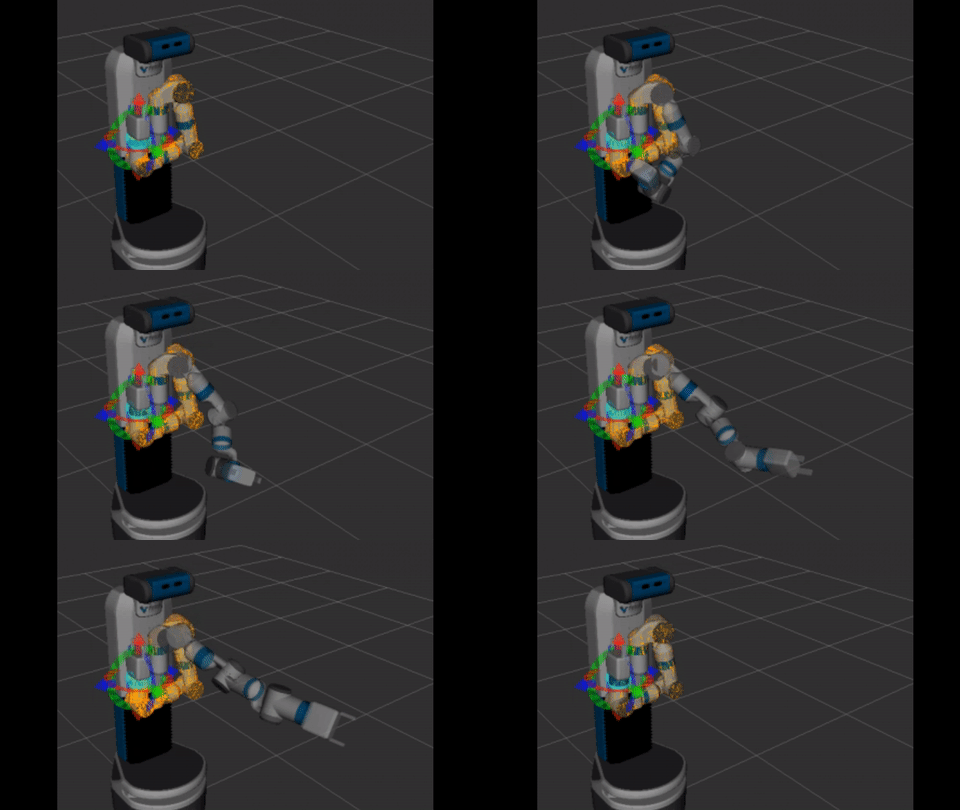
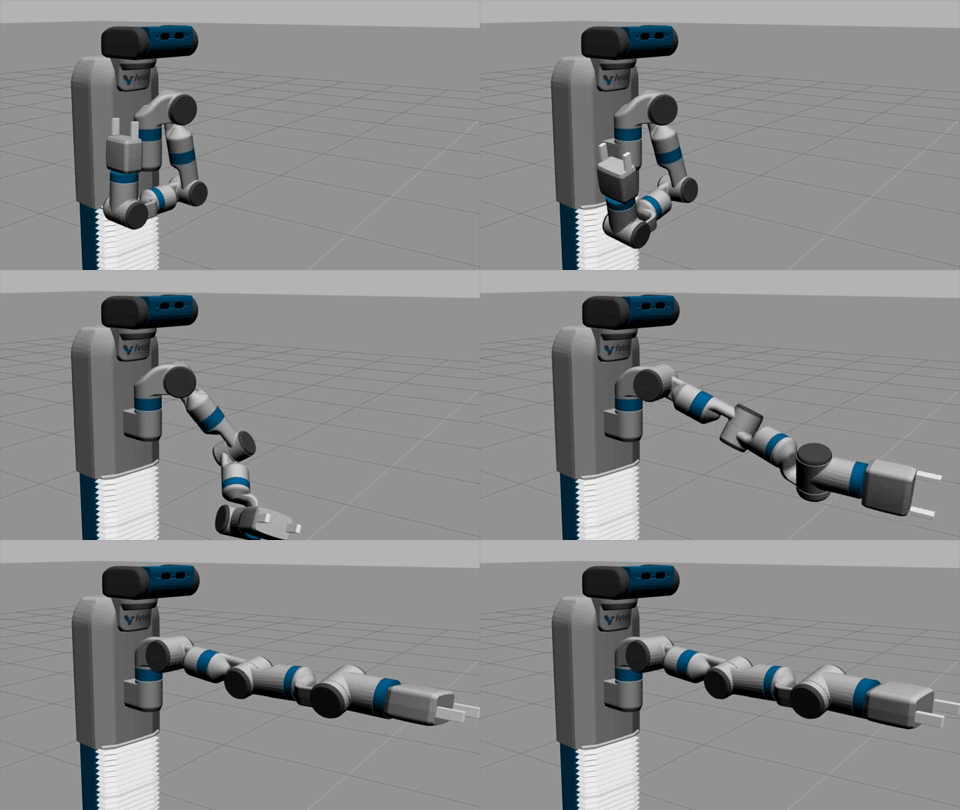
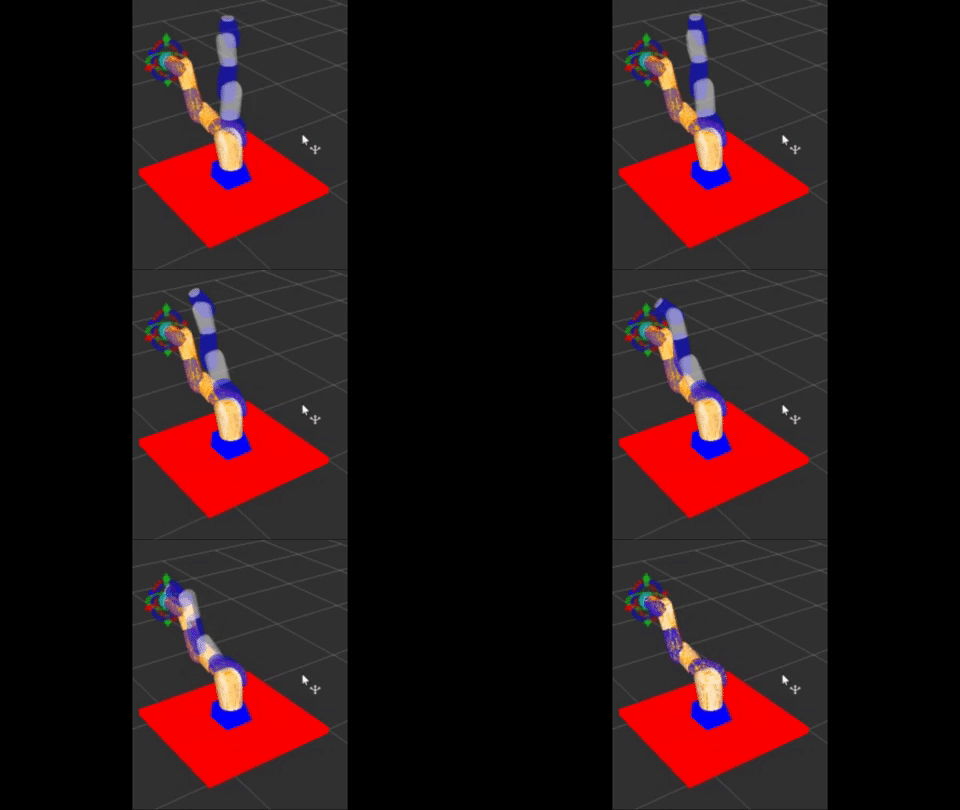
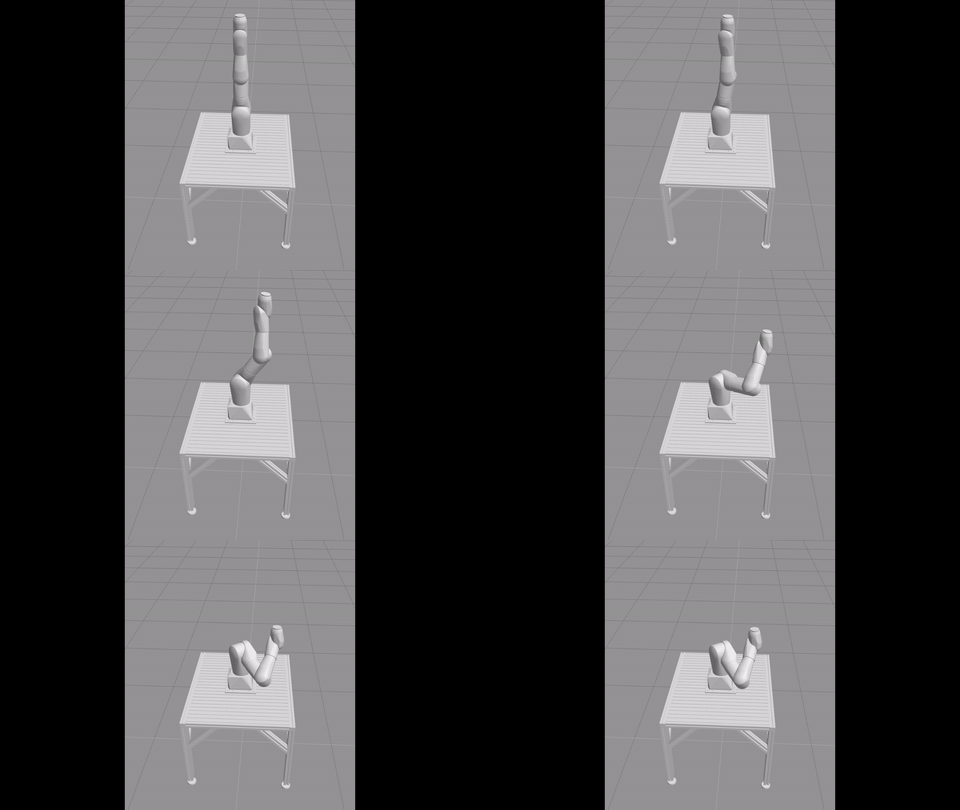
How to solve the problem of calculating the motion plan is a VERY DIFFICULT problem. Fortunately for us, that is what MoveIt! is an expert at. MoveIt! provides us the plan that the joints have to follow to move an arm from one position to another. In the following gif animation, you can see how a plan for making Fetch extend its arm is provided by MoveIt! MoveIt! provides this animation as a way of showing you how the planned trajectory will look like when executed by the robot (the animation is provided by the MoveIt! control page, more later).
Once we have that plan, it is only a matter of sending it properly to the ROS controlled joints. Fortunately, MoveIt! can also take charge of executing the plan in the robot (it is up to you if you want it just to provide you the plan, or plan+execution). In this gif animation, we show you how the simulated robot executes the plan created by MoveIt! on the previous step (you can make MoveIt! send the trajectory to either the simulated or real robot).
Different planners
The code that generates the motion plan is called the planner. Being motion planning a difficult problem, we cannot consider that it has been solved. There is not the best solution to find the joints movement for any robot arm. Because of that, there exist different approaches (different planners) to the calculation of the plans.
Move provides off-the-shelf several planners, each one with its advantages and drawbacks. You can read the full list of provided planners here.
Additionally, to that list, you can develop your own planner too and provide it to MoveIt! as a plugin. You can learn more about moveit plugins here. It is quite a subject, so in case you would like us to do a tutorial on MoveIt! plugins, just let us know below in the comments of the post.
Configuring moveit ros for your robot
In order to be able to use moveit ros with your robot, first, you have to configure it. Fortunately, the configuration of a robotics arm is very simple, provided that you have a URDF file describing your robot. That is a basic requirement. You need to specify someway how your robot is composed, length of the different parts of the arm, which joints it contains, among other things. If you don’t know how to create the URDF of your robot, take this online course to learn how to do it.
Armed with your URDF, you only have to launch the MoveIt! assistant. That is a beautiful piece of configuration that simplifies A LOT the setup of your arm robot (I remember the old days…).
Assuming that you have moveit ros installed in your system (very simple step, watch this page to learn how to install it), now you can launch the assistant with the following command:
Let’s do now a simple example of the configuration.
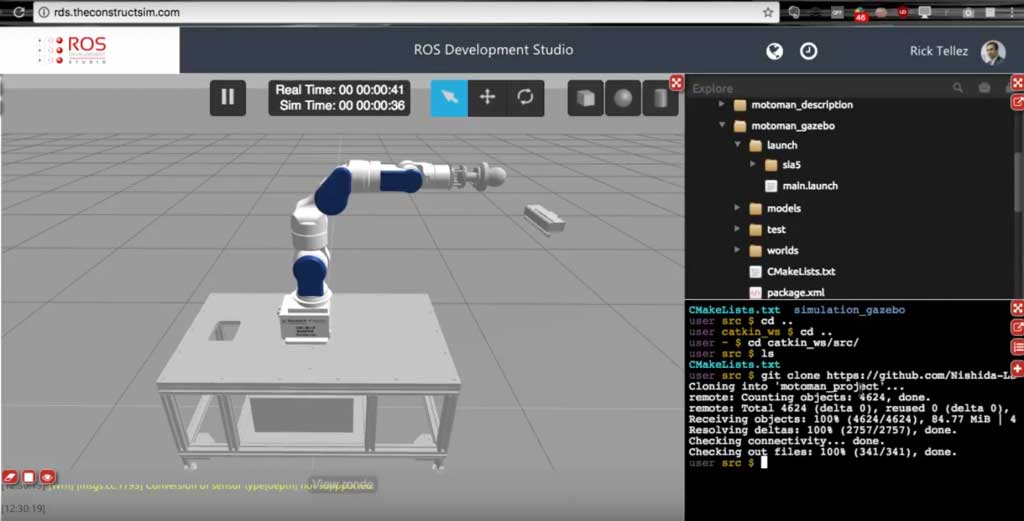
Configuring a Motoman robot
Let’s configure the robot of the figure.
If you do not have that robot to practice with, you can use the simulation of it. Watch this video to learn how to have that simulation running in your computer in only 5 minutes (really, that quick).
For the rest of the tutorial, we are going to assume that you either have the ROS packages of that robot installed in your computer (watch installation tutorial here), or that you are using the simulation as explained in the previous paragraph.
We highly recommend you to do the simulation path!! It is dangerous to do experiments with the real robot when you still don’t know how it works.
For that, just open the MoveIt! assistant as explained above and let’s go through the different configuration screens.
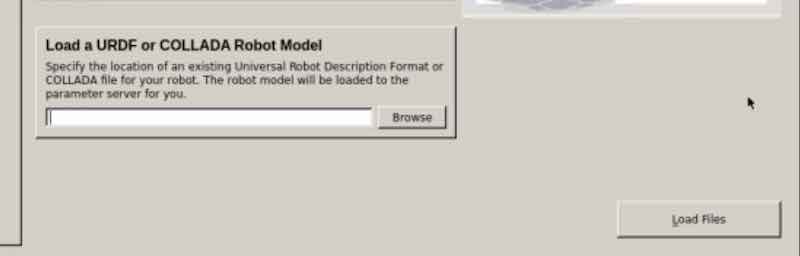
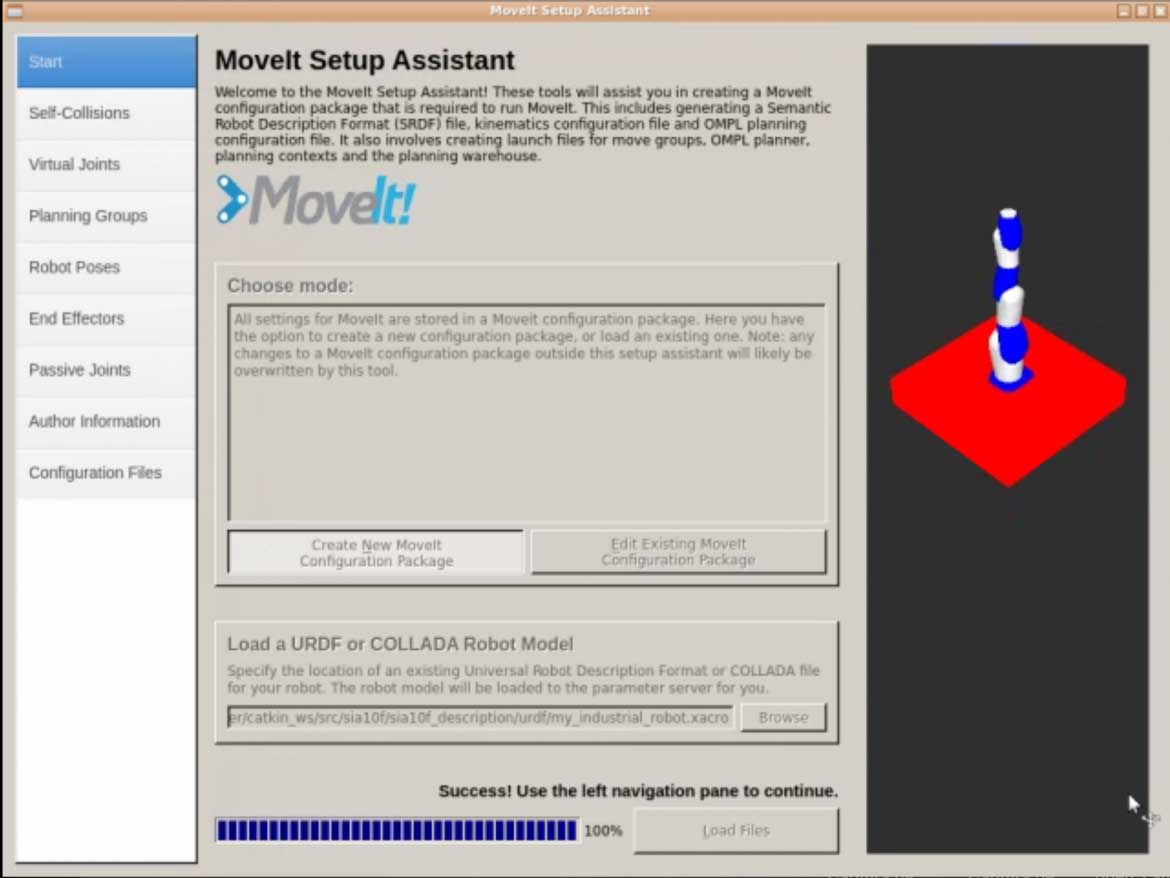
Click on the Create New MoveIt Configuration Package button. A new section like this will appear:
Now, just click the Browse button, select the xacro (URDF) file you the robot, and click on the Load Files button. You should now see this:
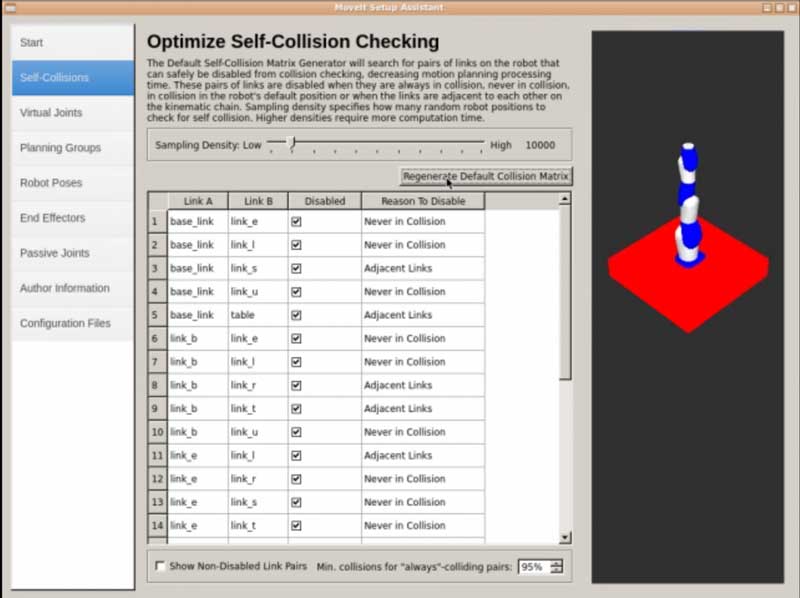
Go to the Self-Collisions tab, and click on the Regenerate Default Collision Matrix button. You will end with something like this:
Here, you are just defining some pairs of links that don’t need to be considered when performing collision checking. For instance, because they are adjacent links, so they will always be in collision.
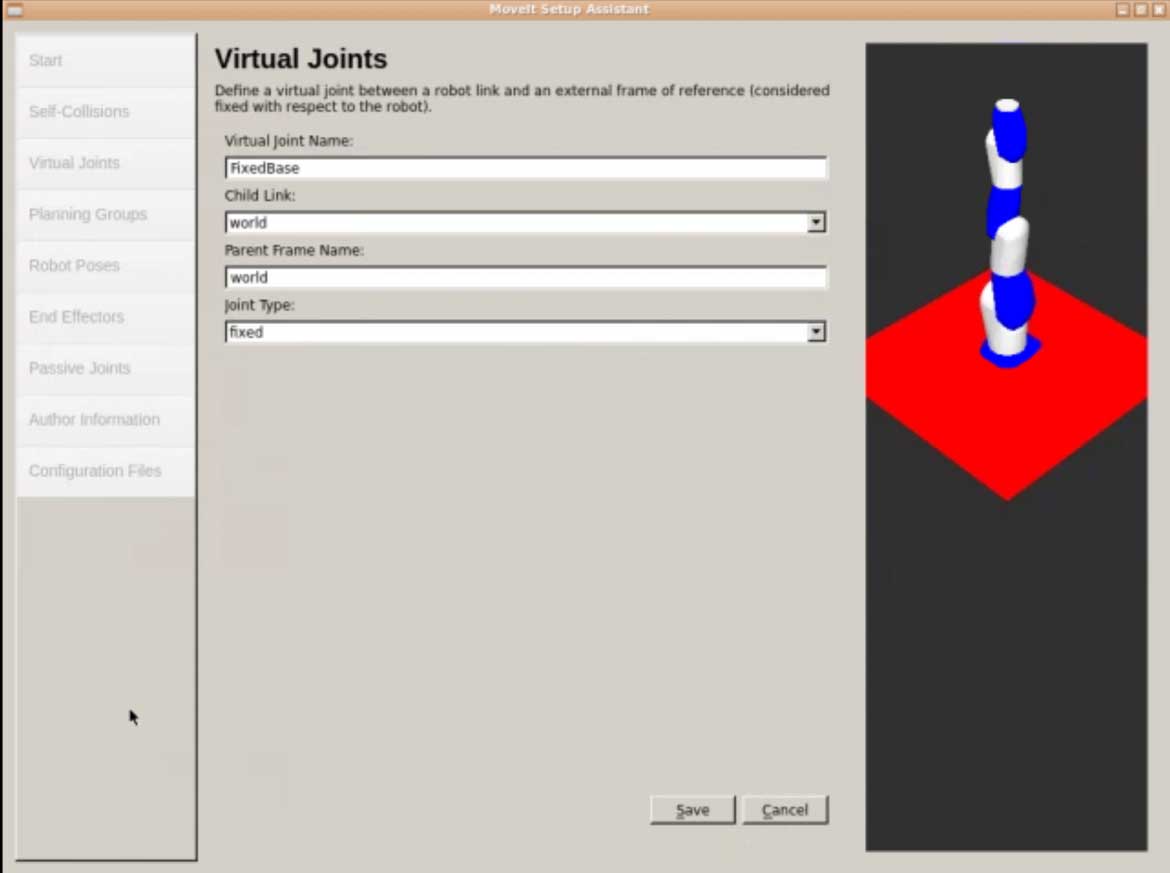
Next, move to the Virtual Joints tab. Here, you will define a virtual joint for the base of the robot. Click the Add Virtual Joint button, and set the name of this joint to FixedBase, and the parent to world. Just like this:
Finally, click the Save button. Basically, what you are doing here is to create an imaginary joint that will connect the base of your robot with the simulated world.
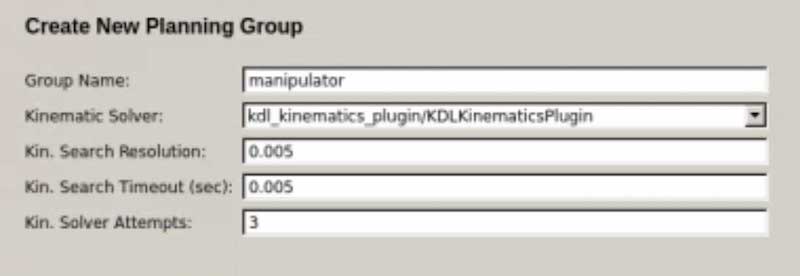
Now, open the Planning Groups tab and click the Add Group button. Now, you will create a new group called manipulator, which uses the KDLKinematicsPlugin. Just like this:
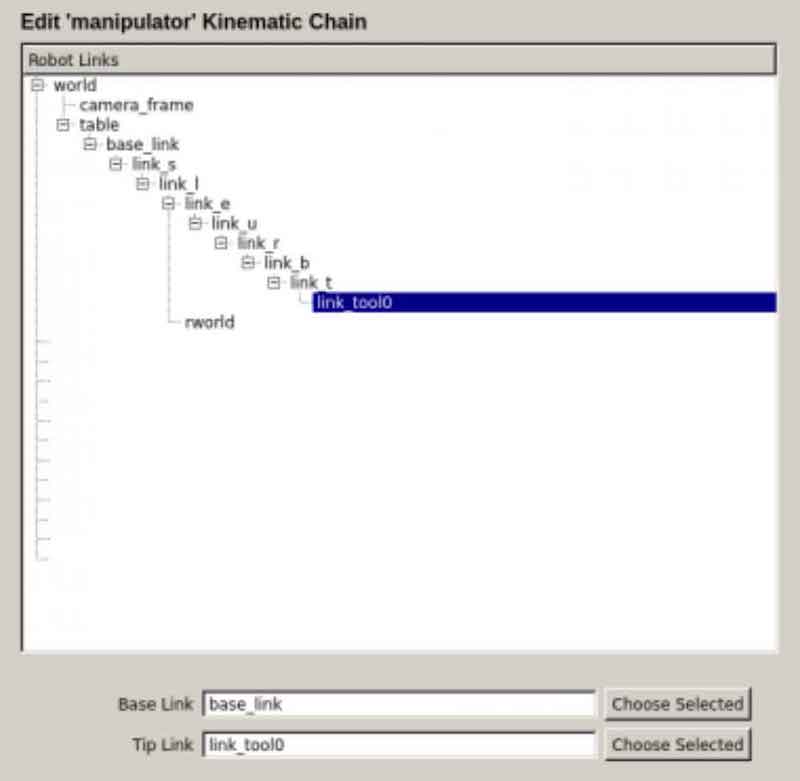
Next, you will click on the Add Kin Chain button, and you will select the base_link as Base Link, and the link_tool0 as Tip Link. Just like this:
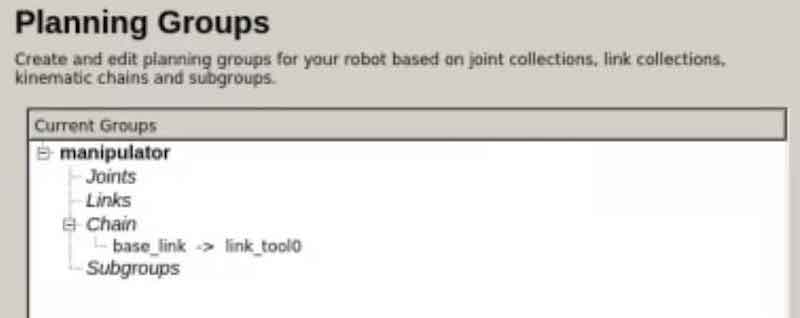
Finally, click the “Save” button and you will end up with something like this:
So now, you’ve defined a group of links for performing Motion Planning with, and you’ve defined the plugin you want to use to calculate those Plans.
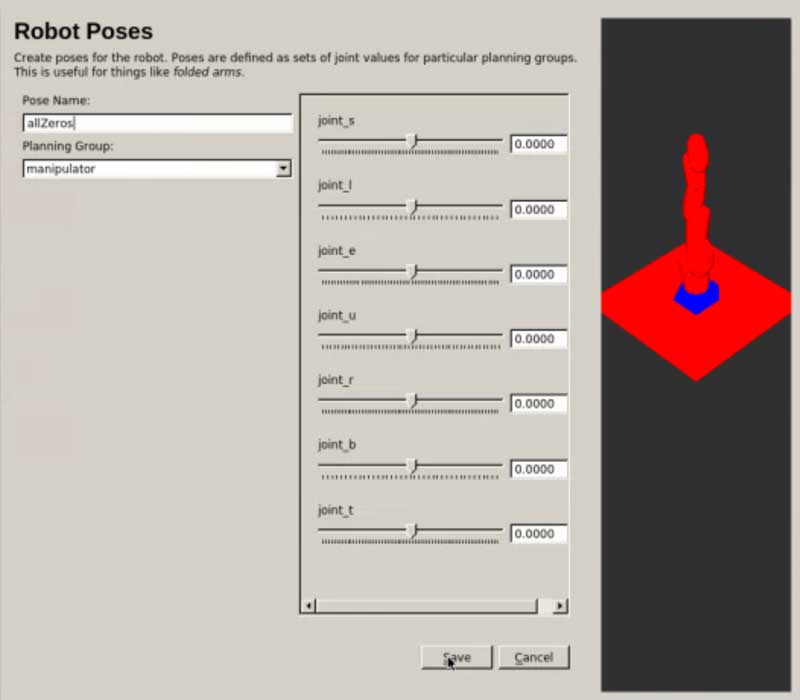
Now, you are going to create a couple of predefined poses for your robot. Go to the Robot Poses tab and click on the Add Pose button. Your robot will appear with all its joints to “0”. So, you will name this pose as allZeros, and click the Save button.
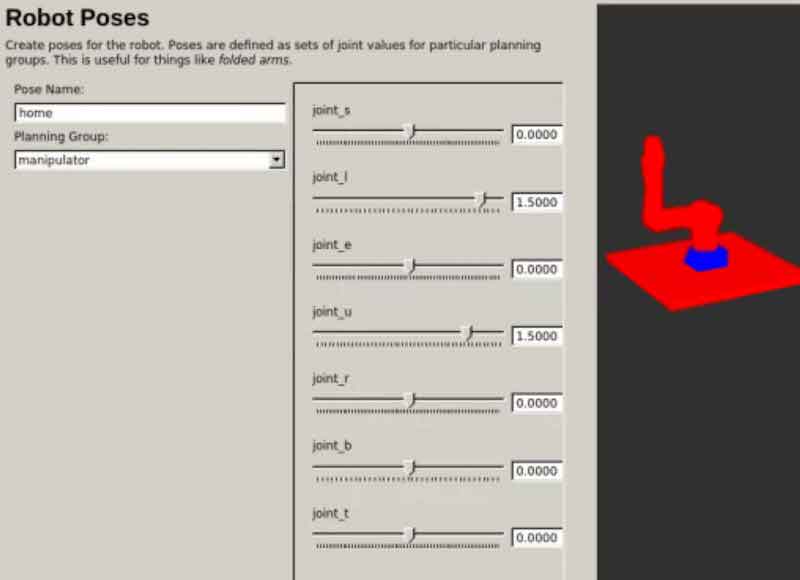
Now, repeat the operation, but this time adjusting the position of the joints so that the robot is in a specific position that we will call home. You can set the joints as you want, but I recommend you to set the robot in a position that is not complicated. For instance, something like this:
This is very useful, for instance, when you know that there are some poses that your robot will have to go many times
Now, just enter your name and e-mail at the Author Information tab.
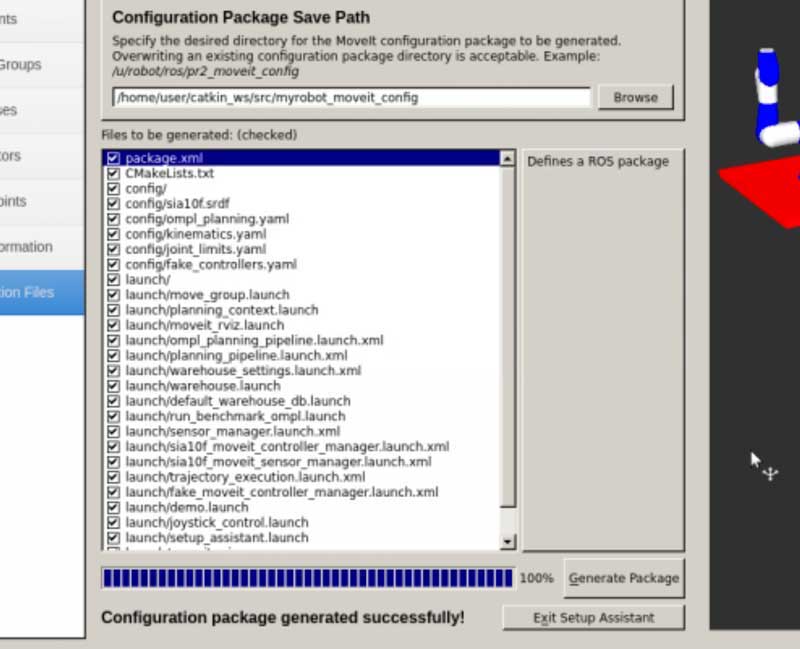
Finally, go to the Configuration Files tab and click the Browse button. Navigate to your catkin_ws/src directory, create a new directory, and name it myrobot_moveit_config. Choose the directory you’ve just created.
Now, click the Generate Package button. If everything goes well, you should see something like this:
And that’s it! You have just created a moveit package for your industrial robot.
Creating a plan
Now you are ready to make moveit ros create a plan for that robot. Remember that moveit ros has two separated functions: create the plan and send the plan to the robot. Here we deal with the first. On the next section below you will learn how to send it to the robot.
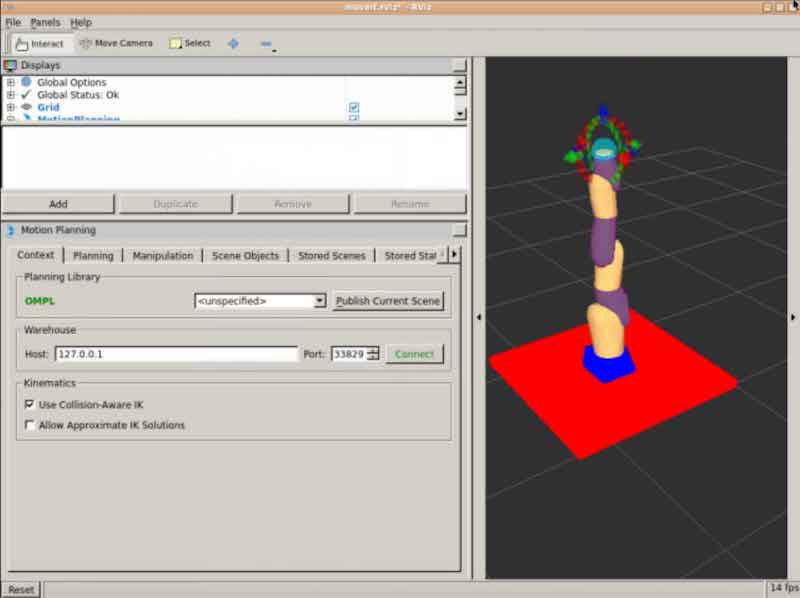
Let’s start the moveit ros Rviz configuration environment with the configuration file we generated:
> roslaunch myrobot_moveit_config demo.launch
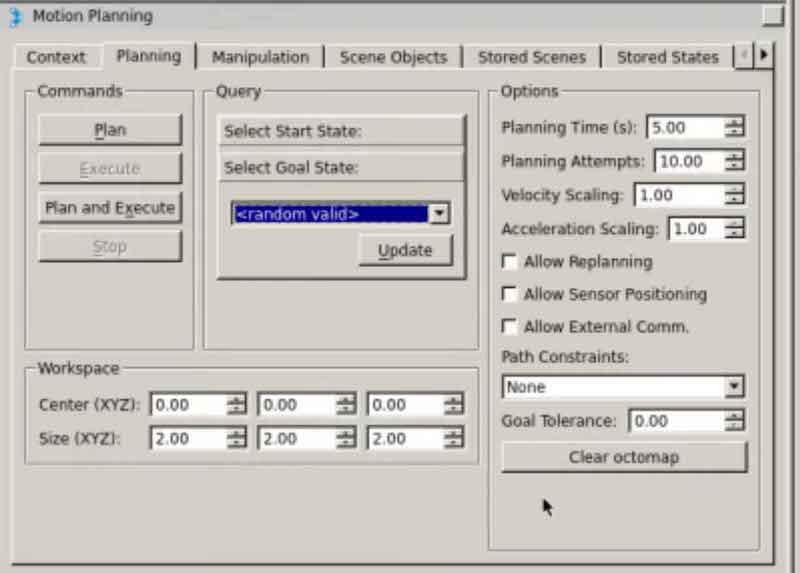
Now, move to the Planning tab. Here:
Before start Planning anything, it is always a good practice to update the current state. Click on Select Start State at the Query section and press the Update button.
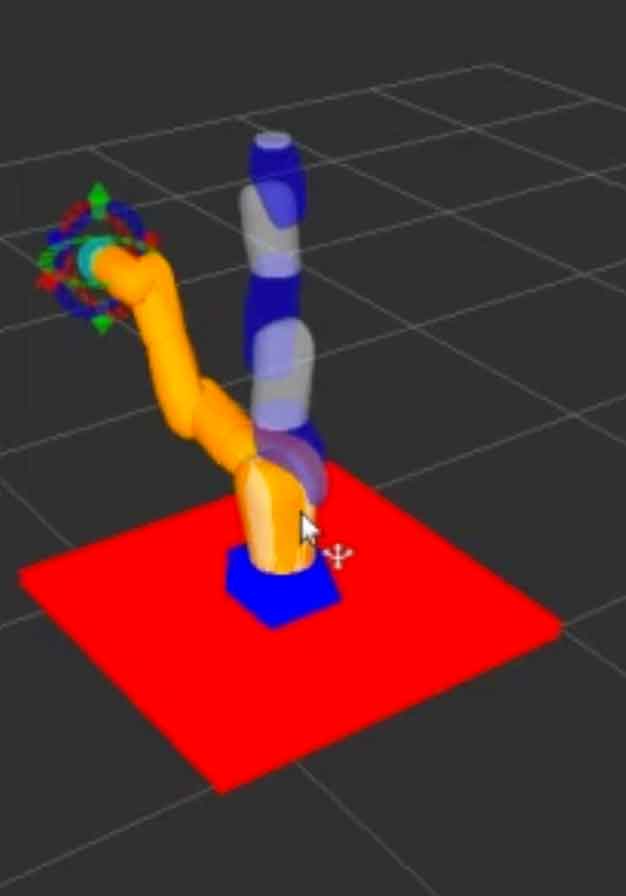
Clicking on the Select Goal State, you can choose the random valid option and click on the Update button. Your robot scene will be updated with the new random position that has been selected (your position may differ from the figure because it is a random one).
Now, you can click on the Plan button at the Commands section. The robot will begin to plan a trajectory to reach that random point.
Sending the plan to the robot
Now that you have a plan for the robot, and that the plan is visualized in the planner window, it is time to send the plan to the robot. The instructions for getting the simulated (or real) robot executing the trajectory are the following:
Create a file to define how you will control the joints of your robot. Inside the config folder of your moveit package, create a new file named controllers.yaml. Copy the following content inside it:
Basically, here you are defining the Action Server (and the type of message that it will use) that you will use for controlling the joints of your robot.
Next, you’ll have to create a file to define the names of the joints of your robot. Again inside the config directory, create a new file called joint_names.yaml, and copy the following content in it:
Now, if you open the myrobot_moveit_controller_manager.launch.xml, which is inside the launch directory, you’ll see that it’s empty. Put the next content inside it:
Finally, you will have to create a new launch file that sets up all the system to control your robot. So, inside the launch directory, create a new launch file called myrobot_planning_execution.launch
Finally, you just have to launch this file and Plan a trajectory, just as you learned to do above. Once the trajectory is planned, you can press the Execute button in order to execute the trajectory in the simulated robot. You should see something like this (actual movement will depend on the selected random trajectory):
Based on the knowledge above, I invite you to experiment with the other options that the moveit ros Rviz tools have and try to generate the specific poses that we configured during the assistant launch.
Avoiding obstacles
Up to this point, you have used moveit ros with a robot that is isolated from the world. This means that the robot cannot collide with anything but itself. However, that is not the real situation of most of the robots. We want robots to be able to plan in an environment where other objects are around.
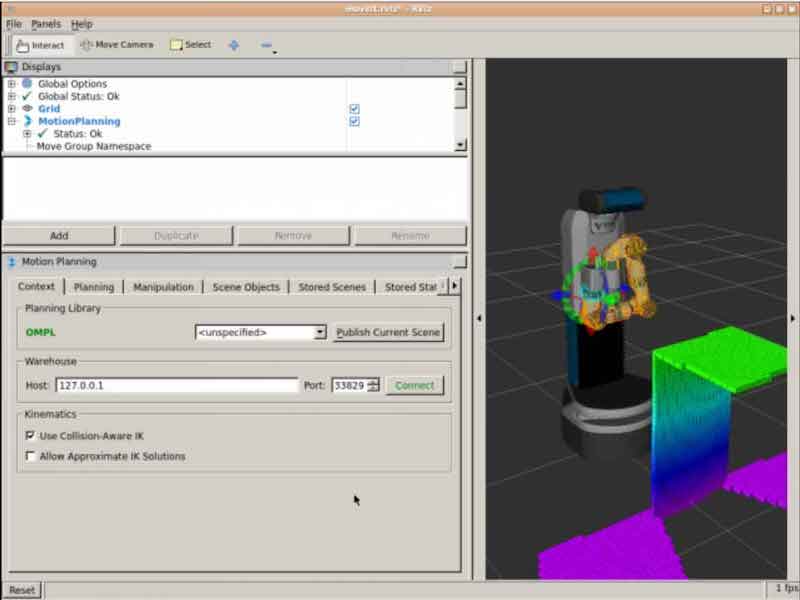
MoveIt! allows to introduce known obstacles in a prior step to planning, so the planning algorithm can take it into account and do not generate trajectories that would collide with the objects around.
In the previous figure, moveit ros is taking into account the table that it is detecting with a Kinect sensor.
The inclusion of obstacles in the trajectory planning is something delicated that cannot be described here now, specially if you want to embed that into a full grasping pipeline, where the robot has to do actual grasps of objects (that at the end, that is what we are making all this for). In case you are interested in learning how to include obstacles in the planning trajectories, and how to actually grasp the objects, please take a look at this course that teaches that subject.
ROS Industrial
Of course, one of the first applications to practical things of MoveIt! is to industrial robots. Industrial robots are based on path planning. Basically, that is the only thing they are required to do. So when MoveIt! came out, the first application was for that kind of robots. This has lead to the creation of the ROS Industrial consortium, a group of people and institutions that try to spread ROS into the industrial sector. Remember that at present ROS is more focused into service robots for which there is no actual industry or market yet. The only robotics market that actually exists is the industrial one. So the move makes perfect sense, since the industrial robotics market is the one closer to provide some revenue.
Under the ROS Industrial umbrella, the consortium makes extensive use of MoveIt! for the control of already existing commercial robots like Kuka, Universal Robots, Motoman, ABB or Fanuc robots. The ROS Industrial packages provide, not only the connection to MoveIt! but also the drivers to ROSify those robots. That means that, by using the ROS Industrial packages you can control those commercial robots with ROS and with MoveIt!
You can download the ROS Industrial packages from their GitHub.
You can have a good practical introduction to ROS Industrial with this course.
Final considerations
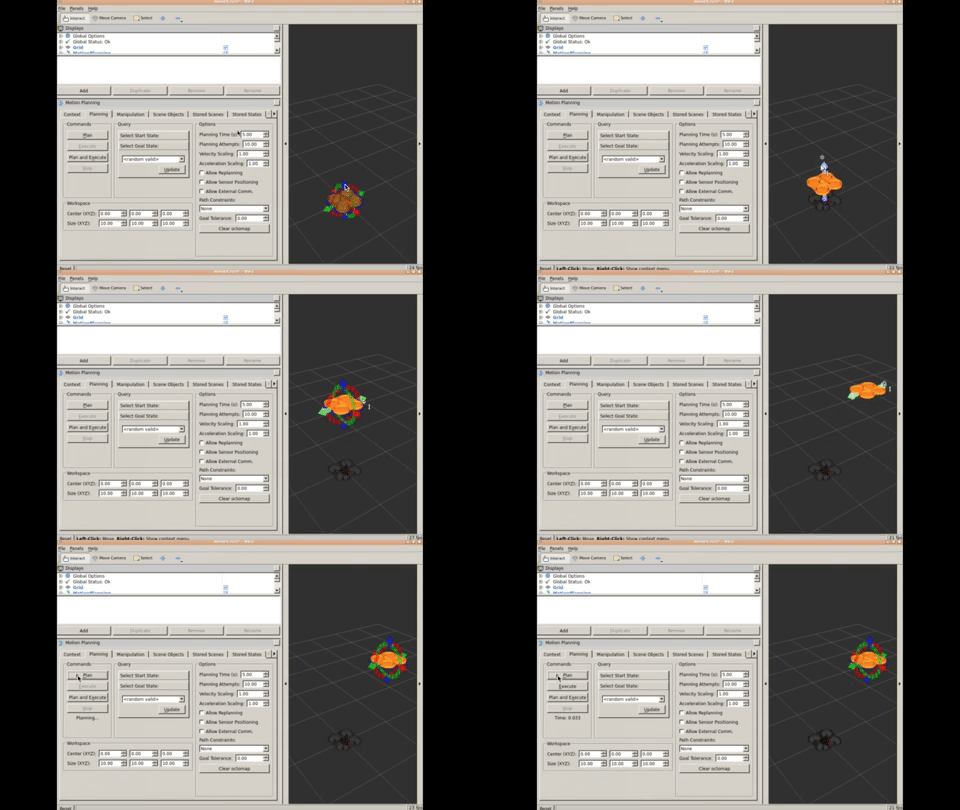
moveit ros is so great package for finding trajectories that can also be used for generating 3D trajectories for other systems that are not robotic arms, like for example for drones. Since drones have to move in a 3D environment while avoiding the obstacles in its way, having a generated plan by MoveIt! makes it a lot easier. For instance, this course teaches how to make a drone navigate using MoveIt! Next animation shows how to use MoveIt! for generating a simple trajectory of a drone.
Conclusion
moveit ros package is the way to go to control robotic arms (either industrial or humanoid robot arms). With its plugin interface for planners, you can attach your own planner if you don’t like what already provided off-the-shelf, and keep using the ROS infrastructure. It is without doubt, the fastest way to use your robotics manipulator. Give it a try and let us know what your experience has been.
To learn more about moveit ros check the following tutorials:
Online course on ROS Industrial with MoveIt! Also uses online simulations to teach you how to use moveit ros with industrial robots. (Additionally, in case you like it, you can use the discount coupon 32C3F924 for a 10% discount)
In this video, the first of a series, we are going to show how to build, debug, test and train, ROS programs by using the ROS Development Studio environment.
This video shows: 1- How to create a new ROS project and how to open it for development 2- How to create your first ROS program 3- How to launch a simulation to test your program, with any of the robots already integrated in the system 4- How to issue ROS commands 5- How to save and close your project

![[RDS] 002 – ROS Development Studio #Howto build, debug, test and train ROS programs](https://www.theconstruct.ai/wp-content/uploads/2018/02/how-to-build-debug-test-and-train-ros-programs-in-ros-development-studio.png)
![[ROS Q&A] 103 – How can I represent a snake robot with many identical segmens in SDF #Part3](https://www.theconstruct.ai/wp-content/uploads/2018/01/ROS-QA-103-How-can-I-represent-a-snake-robot-with-many-identical-segmens-in-SDF-Part3-screen.png)
![[ROS Q&A] 102 – Create a MoveIt! package for Fetch robot](https://www.theconstruct.ai/wp-content/uploads/2018/01/Create-a-MoveIt-package-for-Fetch-robot-screen.png)






![[ROS Q&A] 101 – TF Tutorial – Problem to display second turtle](https://www.theconstruct.ai/wp-content/uploads/2018/01/TF-Tutorial-Problem-to-display-second-turtle-screen.png)
![[ROS Q&A] 100 – ROS Development Studio Howto #1](https://www.theconstruct.ai/wp-content/uploads/2018/01/ros-development-studio-how-to-series-ros-tutorials-1-screen.png)