
BotBox
Warehouse Lab
READY FOR CLASS
A classroom robot kit for teaching robotics with real robots, simulations, projects, and courses—designed for university and professional robotics education.
BotBox Warehouse Lab
Ready for Class
A classroom robot kit for teaching robotics with real robots, simulations, projects, and courses—designed for university and professional robotics education.
Robotics Lab-in-a-Box: Easily Teach Robotics
Deliver experience-based robotics classes with minimal preparation & maintenanceRobotics Lab-in-a-Box: Easily Teach Robotics
Deliver experience-based robotics classes with minimal preparation & maintenance

01 / THE COMPLETE SOLUTION
Start your robotics class in 5 minutes.
ALL PACKAGES
3 autonomous robots.
ALL PACKAGES
Ready online or offline.
★ ULTIMATE PACK
See. Grasp. Move.
Robotic arm · Jetson Nano · Arm camera for VLA
1
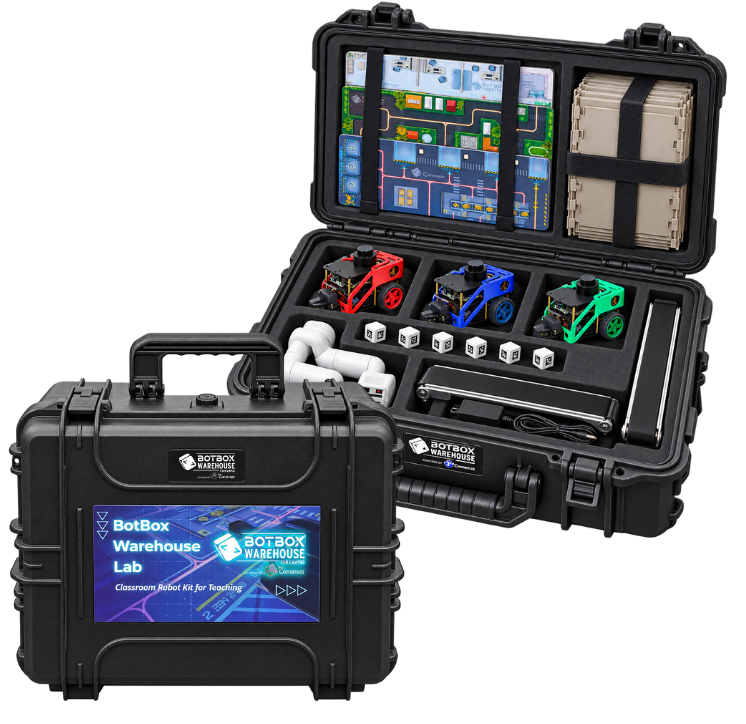
Unpack the box
Portable hardware arrives together in one classroom kit.
2
Switch on and connect
Turn on the router and robots. They’ll connect automatically and be ready for teaching.
3
Start teaching
Launch a ROS project in simulation or directly on the real robots.
02 / ROBOT HARDWARE
Real robots.
Real robots.
Serious engineering.
Serious engineering.
A lab-in-a-box for teaching robotics, including off-the-shelf robots, the environment, simulations, and projects for your students.
ALL PACKAGES
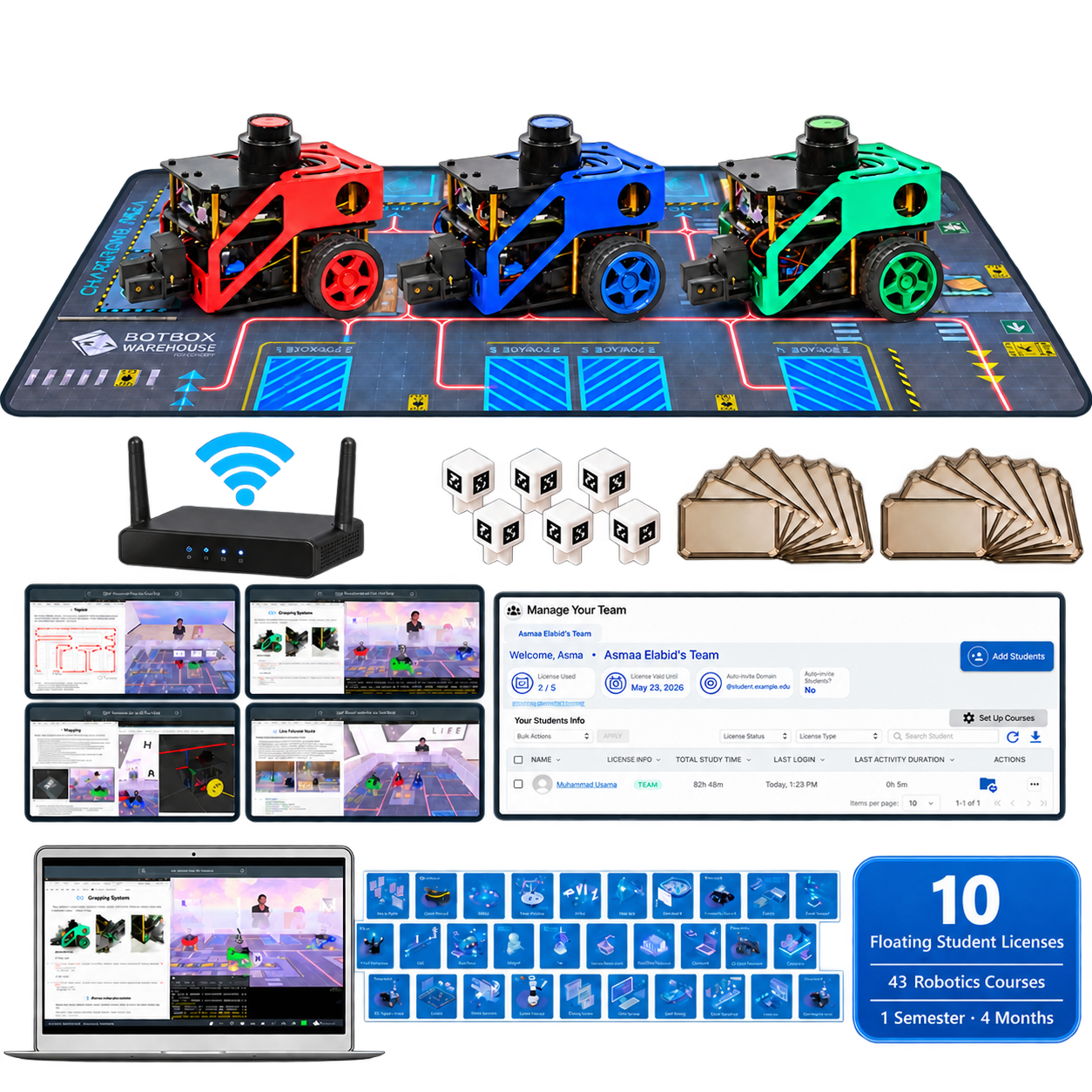
3× FastBot Pro with Grippers
ALL PACKAGES
3× FastBot Pro with Grippers
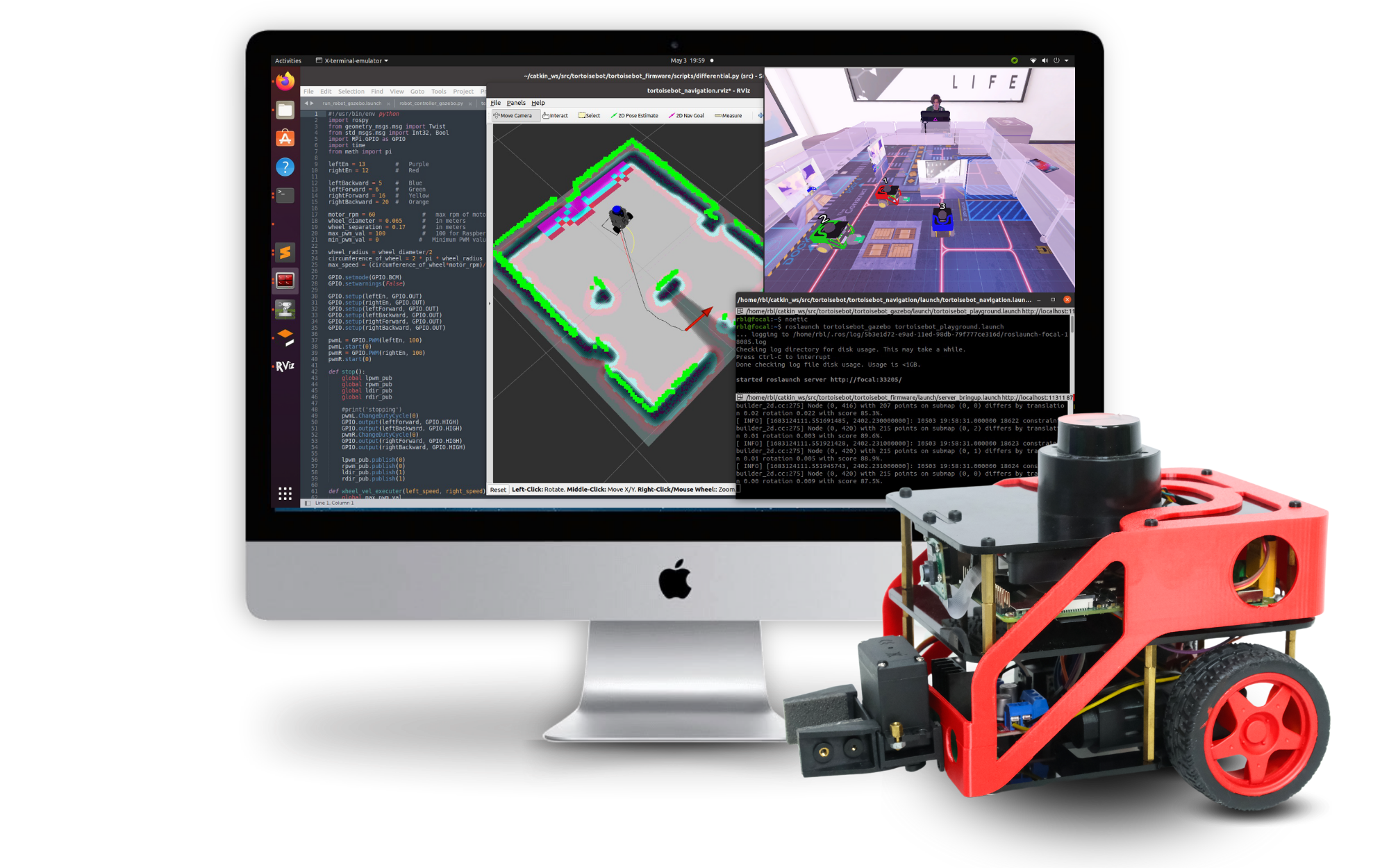

Raspberry Pi 4
2 GB onboard computer for ROS 2 applications.
LSLiDAR N10
Real laser sensing for mapping and navigation.
Pi Camera
Visual input for inspection and perception projects.
Encoders + DC Motors
Observable closed-loop mobile control.
Robot Gripper
Pick, carry and place warehouse payloads.
11.1V LiPo Battery
Supports repeatable hands-on classroom sessions.
★ ULTIMATE PACK
Robotic Arm Setup
03 / READY TO RUN
Less setup. More teaching.
Built for educators running practical robotics classes.
Preconfigured Router Included
Power on the router and connect student laptops. Every robot is ready to access—no internet required.

Hot Swap Batteries
Hot-swap batteries to keep FastBot running during a battery change, so students can continue coding and experimenting without interruption.
03 / READY TO RUN
Less setup. More teaching.
Built for educators running practical robotics classes.
Preconfigured Router Included
Power on the router and connect student laptops. Every robot is ready to access—no internet required.
Hot Swap Batteries
Hot-swap batteries to keep FastBot running during a battery change, so students can continue coding and experimenting without interruption.

BotBox Warehouse Lab Kit


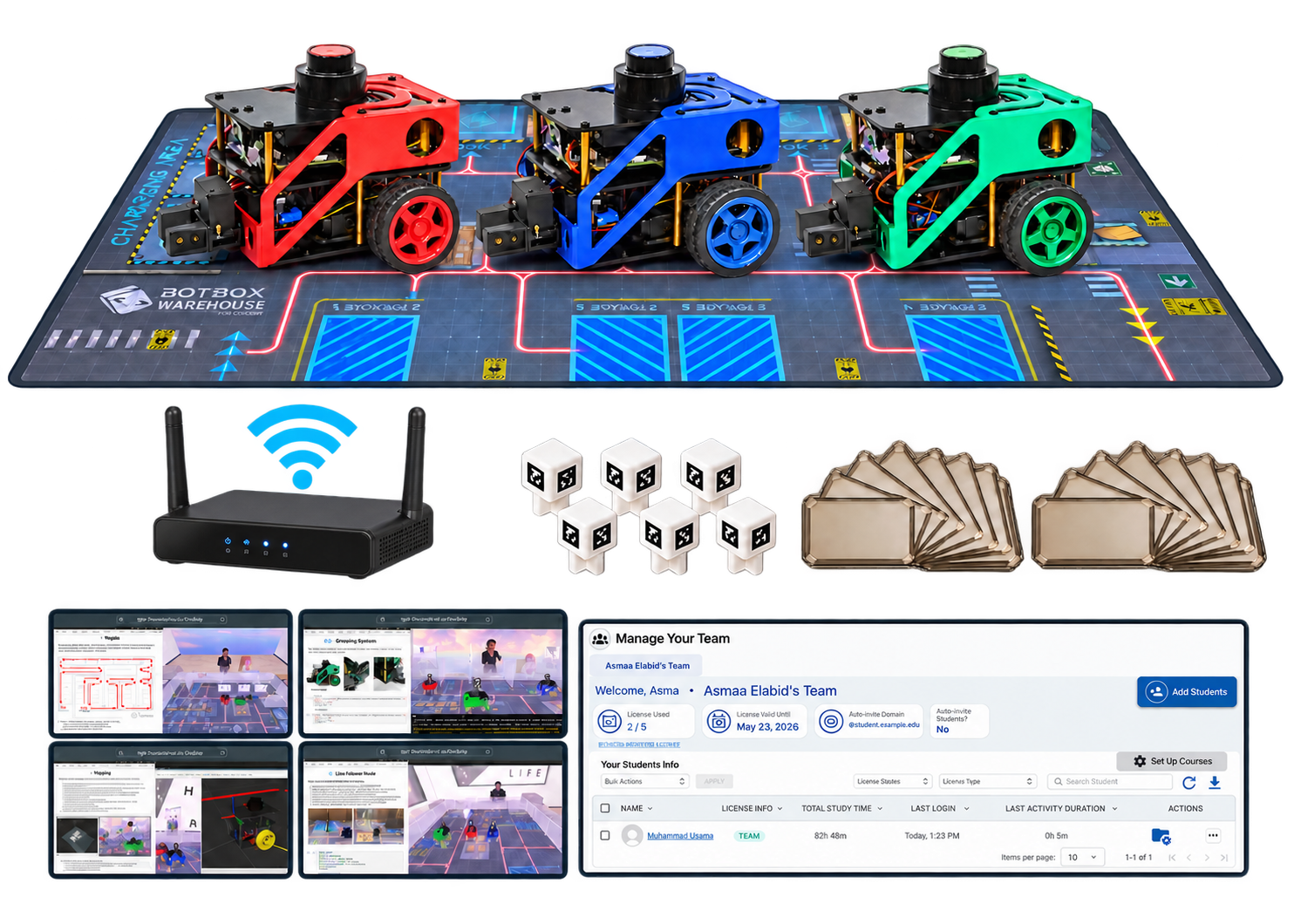
Easy to Assemble & Store
Can be easily assembled by one person
04 / SOFTWARE + CURRICULUM
Projects included.
Real robotics skills.
Each exercise connects simulation, ROS 2 code and observable behavior on real robots.
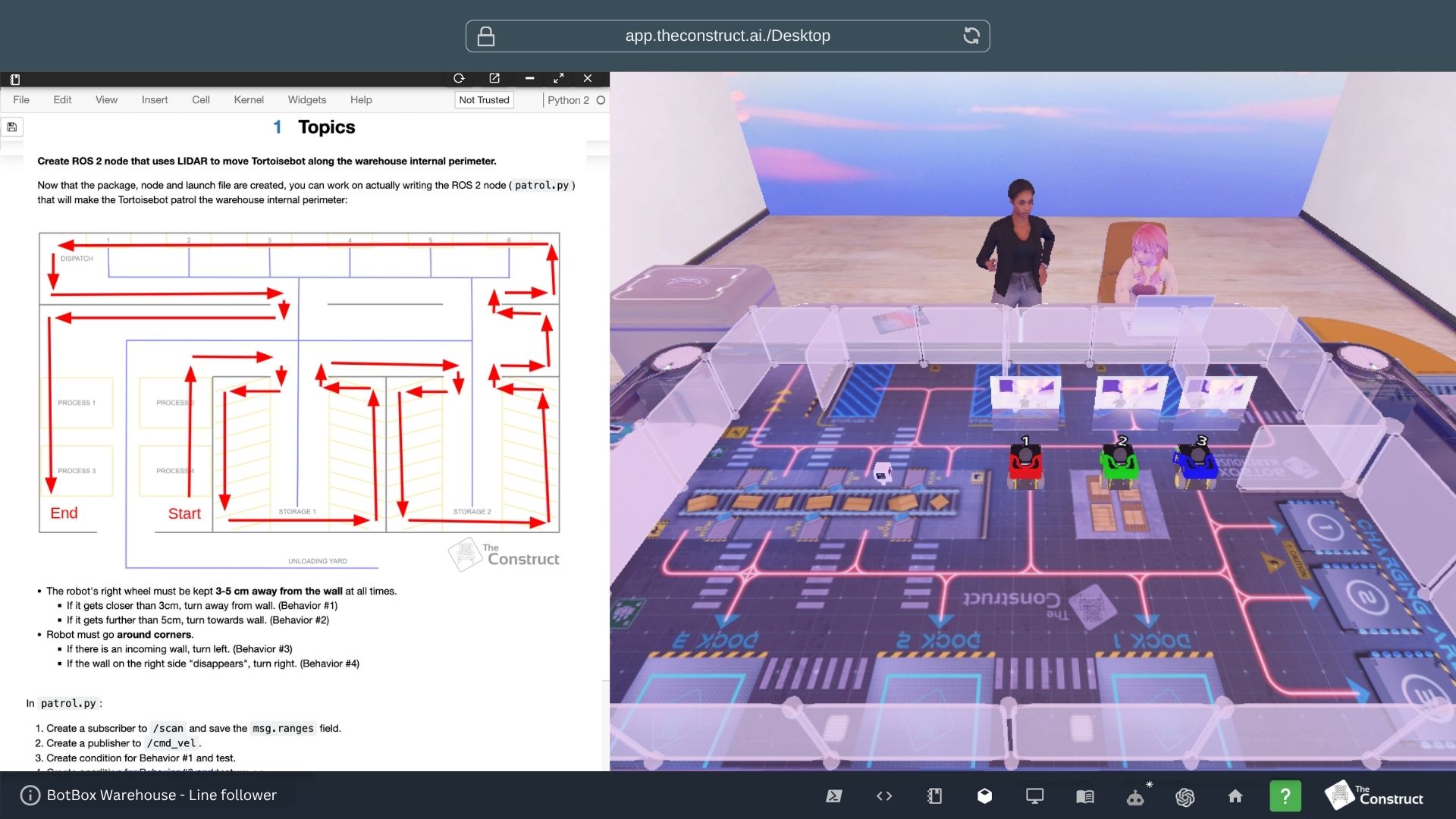
ROS 2 Basics
In this project, students will create ROS 2 nodes to make a robot patrol a warehouse, capturing images of points of interest while tracking the distance traveled.
★ STANDARD PACK
★ ULTIMATE PACK
READY-TO-TEACH CURRICULUM
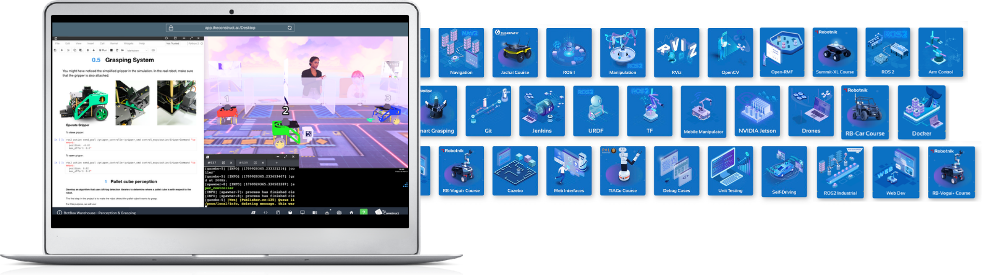
Courses for the class. Control for the educator.
04 / SOFTWARE + CURRICULUM
Projects Included.
Real robotics skills.
Each exercise connects simulation, ROS 2 code and observable behavior on real robots.
ROS 2 Basics
In this project, students will create ROS 2 nodes to make a robot patrol a warehouse, capturing images of points of interest while tracking the distance traveled.
★ STANDARD PACK
★ ULTIMATE PACK
READY-TO-TEACH CURRICULUM
Courses for the class. Control for the educator.
FULLY CUSTOMIZABLE
Open-source
Built to evolve.
Open-source software and modular hardware let educators inspect, modify and extend the lab for their own research and curriculum.
OPEN-SOURCE SOFTWARE
MODULAR HARDWARE
FIND YOUR BOTBOX
Choose your teaching setup.
The practical foundation
★ STANDARD PACK
Complete curriculum
10 Floating Student Licenses
★ ULTIMATE PACK
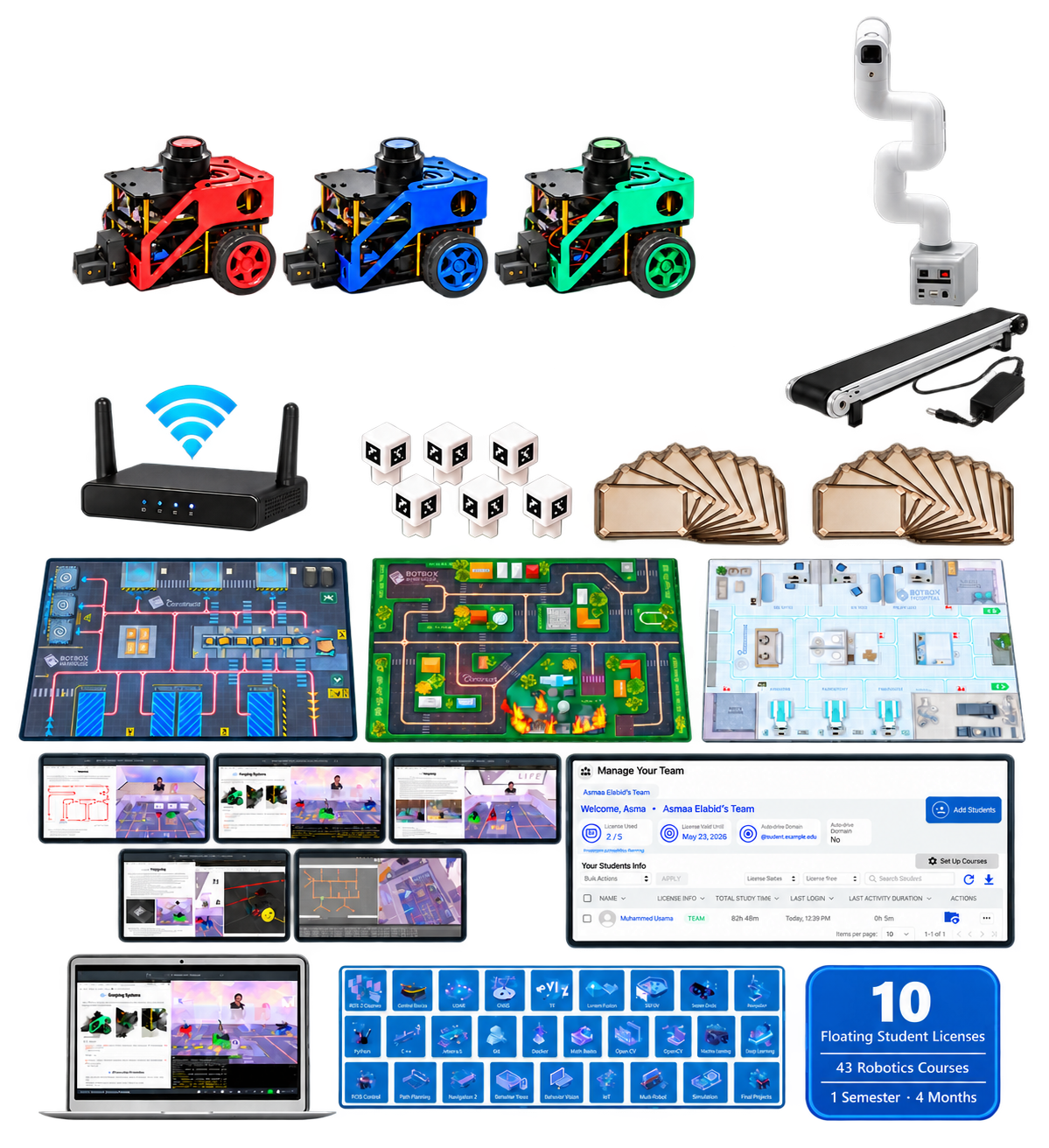
Full automation lab
Robotic Arm
NVIDIA Jetson Nano control board + Arm camera for VLA
Conveyor belt
All 3 floor maps
10 Floating Student Licenses
Additional project on robot fleet management
| IN EVERY PACKAGE | Preconfigured router | Hot-swap battery system |
Free shipping*
|
IN EVERY PACKAGE
✓ Preconfigured router
✓ Hot-swap battery system
✓ Free shipping*
OPTIONAL ADD-ON · SOLD SEPARATELY
24/7 automatic wireless charging
Add autonomous charging to any package when the lab needs continuous operation without manual battery changes.
FAQS
A few useful answers.
Are the hardware and software components open-source and customisable?
Does the BotBox allow students to access The Construct's courses?
If you choose the Standard or Ultimate version, up to 10 students will have full access to all 43 courses for a period of 4 months.
For the Basic Botbox, no access to the courses is provided
How are BotBox ROS Projects shared with students?
We provide the teacher with a copy of each project in the form of a ROS Project in the cloud of The Construct (which can be acessed with a free account).
The teacher can then share a unique link with students for each project.
Each student who accesses the link will receive an individual copy of the ROS Project, allowing them to open it in the cloud with a free account and work independently without affecting other students’ progress.
In addition, teachers can track each student’s progress through the dedicated Students Management Panel. This includes:
- Whether the student has opened the project
- Time spent working on the project
- Completion status of exercises and tasks
This feature allows educators to monitor student engagement, identify learning gaps, and provide targeted support when necessary.
Can a Basic or Standard BotBox be upgraded later to an Ultimate version by paying the difference?
Yes, you can upgrade your Basic or Standard BotBox to the Ultimate version at any time by requesting additional components or features. You will be billed accordingly based on the selected upgrades.
Are spare or replacement parts included in the BotBox?
No, spare or replacement parts are not included by default. However, you can add extra components or materials to your order for an additional cost.
We include international shipping costs in the product price. However, customs duties, import taxes (including VAT or GST), and any additional fees charged by local authorities or courier services are not included.
Please check with your local customs office for more information on import requirements and charges before placing your order.
Carrier Information
Our default shipping carrier is DHL. However, as our products contain batteries and motors, some countries or regions may have restrictions on DHL shipments. In such cases, we will arrange an alternative carrier—UPS, FedEx, or a dedicated logistics line—based on the shipping requirements of your destination.
Shipping Info
After your package is sent out, we will also send you an email with your tracking number and tracking link.
Shipping Address
We will ship according to the shipping address you provided, please notify us any address change before we update your tracking number.
Insurance
We do not offer insurance that covers you in the unlikely event that your parcel is lost or damaged by the postal services.
Reception
With standard courier practice, you check the contents of the parcel before signing for your goods. If you do not, we can’t be held liable for any damage that may have occurred in transit.
Remote region
If you are in a remote area, we will communicate with you by email about the extra cost of freight.
* Worldwide free shipping
* 30-day free returns (shipping not included)
* 12-Month Hardware Warranty (Parts and Repair Included)
* Free Technical Support (Community Forum, and Online User Manual)
Having problems? Need help?
Please email us at: info@theconstruct.ai
* Providing photos and videos illustrating your problems will help us serve you much faster.
Online Forum Access
After your purchase, you will receive an exclusive invitation to our private support forum. In this dedicated space, you can get direct technical assistance from our team, ask questions, and connect with other users to ensure you make the most of your product.
Online User Manual
Upon completing your purchase, you will receive a link to our comprehensive online user manual. This guide provides step-by-step instructions on how to set up your lab, operate your robot, and manage your students effectively—everything you need to get started with confidence.
Email Support
If you encounter any issues or have specific questions, you can always reach out to our team via email at info@theconstruct.ai. We’re here to help.
Email: info@theconstruct.ai
Phone: (+34) 687 672 123